AI-Driven Platform in AWS
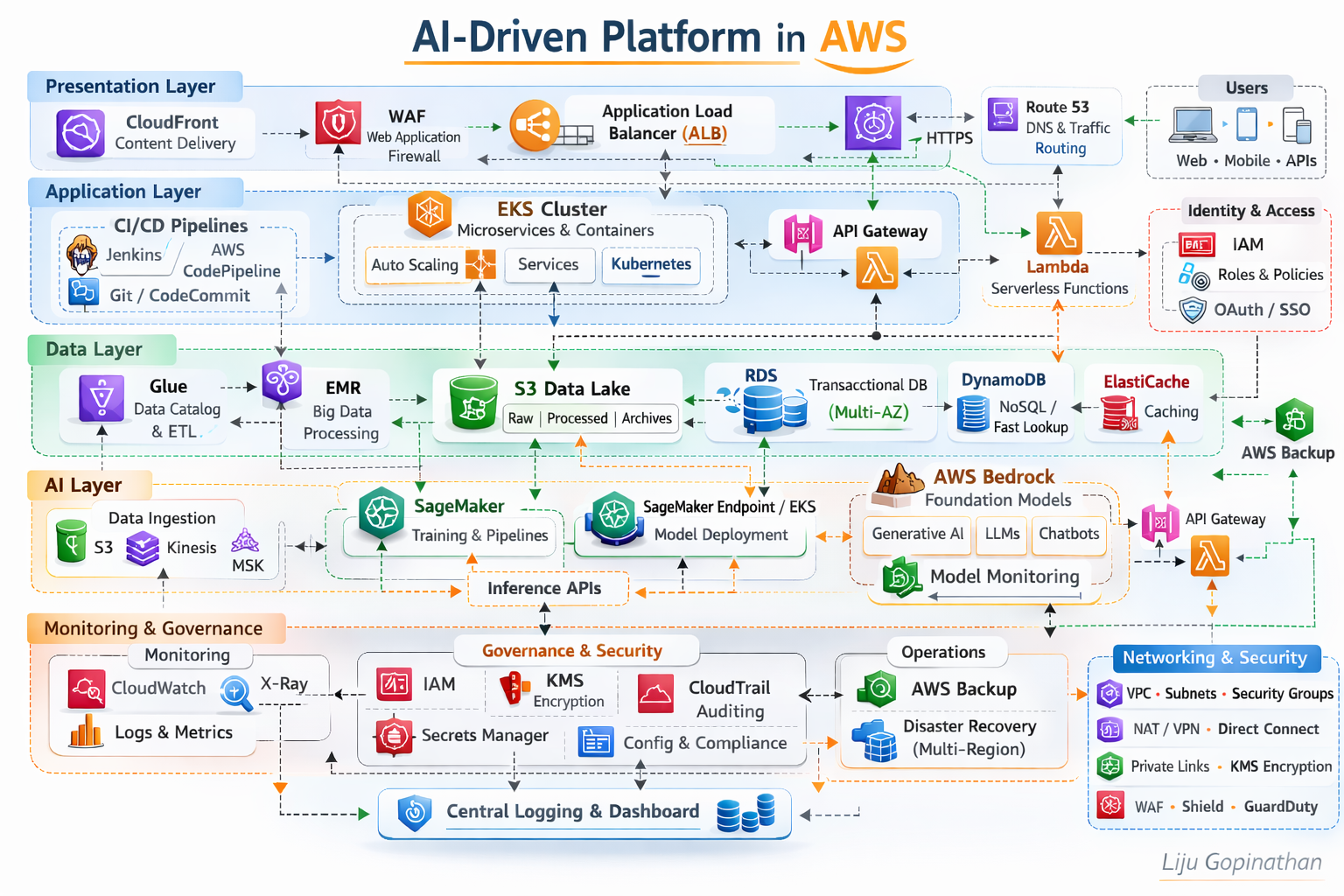
A Layered, Secure, Scalable and AI-Ready Cloud Architecture
This architecture represents a modern, enterprise-grade AI-driven platform built natively on AWS. It follows a layered architectural model aligned to AWS best practices, the AWS Well-Architected Framework, and modern cloud-native and MLOps principles.
The platform is structured into five logical layers:
- Presentation Layer
- Application Layer
- Data Layer
- AI/ML Layer
- Monitoring, Governance & Security
Each layer is independently scalable, loosely coupled, and secured by design.
Presentation Layer – Edge Optimised and Secure
The Presentation Layer is responsible for global traffic distribution, edge security, and controlled ingress into the platform.
Key Components:
- Amazon CloudFront
- AWS WAF
- Application Load Balancer (ALB)
- Route 53
Architecture Rationale:
Amazon CloudFront provides low-latency global content delivery and acts as the first entry point for users (Web, Mobile, APIs). It improves performance while reducing origin load.
AWS WAF enforces Layer 7 security policies, protecting against OWASP top 10 vulnerabilities, bot traffic, and malicious payloads.
Application Load Balancer (ALB) routes HTTPS/WebSocket traffic into backend services based on path-based or host-based routing rules.
Route 53 ensures highly available DNS resolution and intelligent traffic routing.
This layer ensures:
- Global scalability
- DDoS mitigation (via Shield integration)
- TLS termination
- Secure API ingress
Application Layer – Cloud-Native Compute & Microservices
The Application Layer is built around containerised and serverless patterns.
Key Components:
- Amazon EKS (Kubernetes)
- AWS Lambda
- Amazon API Gateway
- CI/CD (Jenkins, AWS CodePipeline, Git)
Architecture Rationale:
Amazon EKS orchestrates containerised microservices using Kubernetes. It supports:
- Horizontal Pod Autoscaling
- Service mesh integration (if required)
- Rolling deployments
- Multi-AZ resilience
Microservices are packaged as Docker containers and deployed through automated CI/CD pipelines.
AWS Lambda supports event-driven workloads and lightweight APIs, reducing operational overhead.
Amazon API Gateway exposes REST/HTTP APIs securely, enabling throttling, authentication, and monitoring.
CI/CD pipelines ensure:
- Infrastructure as Code (Terraform/CloudFormation)
- Automated deployments
- DevSecOps integration
- Blue/Green or Canary releases
This layer provides:
- Elastic scaling
- Service isolation
- Zero-downtime deployments
- Microservices-based modularity
Data Layer – Multi-Model Data Platform
The Data Layer supports transactional, analytical, and AI workloads.
Key Components:
- Amazon RDS (Multi-AZ)
- Amazon DynamoDB
- Amazon S3 (Data Lake)
- AWS Glue
- AWS EMR
- ElastiCache
Architecture Rationale:
Amazon RDS (Multi-AZ) provides high availability for relational transactional workloads.
Amazon DynamoDB handles high-throughput, low-latency NoSQL use cases.
Amazon S3 acts as the central data lake:
- Raw data
- Processed data
- Model artifacts
- Logs and archives
AWS Glue manages metadata cataloguing and ETL orchestration.
Amazon EMR supports distributed big data processing (Spark/Hadoop).
ElastiCache improves performance through in-memory caching.
This layer enables:
- Hybrid OLTP + analytical workloads
- Structured and unstructured data support
- AI feature pipelines
- Scalable storage and processing
AI Layer – MLOps & Generative AI Enablement
The AI Layer integrates traditional ML and Generative AI capabilities.
Key Components:
- Amazon SageMaker (Training, Pipelines, Model Registry)
- SageMaker Endpoints / EKS for inference
- AWS Bedrock (Foundation Models)
- Feature Store
- Streaming ingestion (Kinesis/MSK)
Architecture Rationale:
Amazon SageMaker enables:
- Model training
- Hyperparameter tuning
- Managed pipelines
- Model versioning
- Automated MLOps lifecycle
Models are deployed through:
- SageMaker Endpoints (managed inference)
- EKS (customised containerised inference)
AWS Bedrock integrates foundation models such as Claude, Titan, LLaMA, enabling:
- Generative AI applications
- Chatbots
- Document summarisation
- Intelligent automation
The architecture supports:
- Batch inference
- Real-time inference APIs
- Model monitoring
- Responsible AI governance
This layer enables the platform to be:
- AI-first
- GenAI-ready
- MLOps governed
- Scalable for enterprise workloads
Monitoring, Governance & Security – Cross-Layer Controls
Security and observability are embedded across all layers.
Monitoring Components:
- Amazon CloudWatch (Metrics & Logs)
- AWS X-Ray (Tracing)
- AWS CloudTrail (Auditing)
Governance & Security:
- IAM (Role-based access control)
- KMS (Encryption at rest)
- Secrets Manager
- VPC segmentation
- Security Groups
- AWS Backup
- Multi-Region Disaster Recovery
Architecture Principles:
IAM Roles & Policies enforce least privilege access per persona:
- Developer
- Deployer
- Operations
- AI Engineer
KMS ensures encryption of:
- S3
- RDS
- DynamoDB
- Model artifacts
CloudTrail ensures auditability for compliance-heavy industries.
AWS Backup + Multi-Region strategy ensures business continuity.
This governance model aligns with:
- Security pillar of Well-Architected Framework
- Compliance-driven industries
- Enterprise-grade audit requirements
Architectural Characteristics
This platform demonstrates:
- Multi-AZ high availability
- Horizontal scalability
- Microservices architecture
- MLOps lifecycle integration
- Generative AI capability
- Event-driven extensibility
- Secure-by-design networking
- Infrastructure as Code automation
Design Philosophy
It reflects modern enterprise cloud architecture principles where AI is not an add-on but a native capability within the platform. This architecture is intentionally layered to :
- Separate concerns across compute, data and AI
- Enable independent scaling
- Reduce blast radius
- Improve governance
- Accelerate innovation without compromising security
Enterprise Azure Data & AI Platform
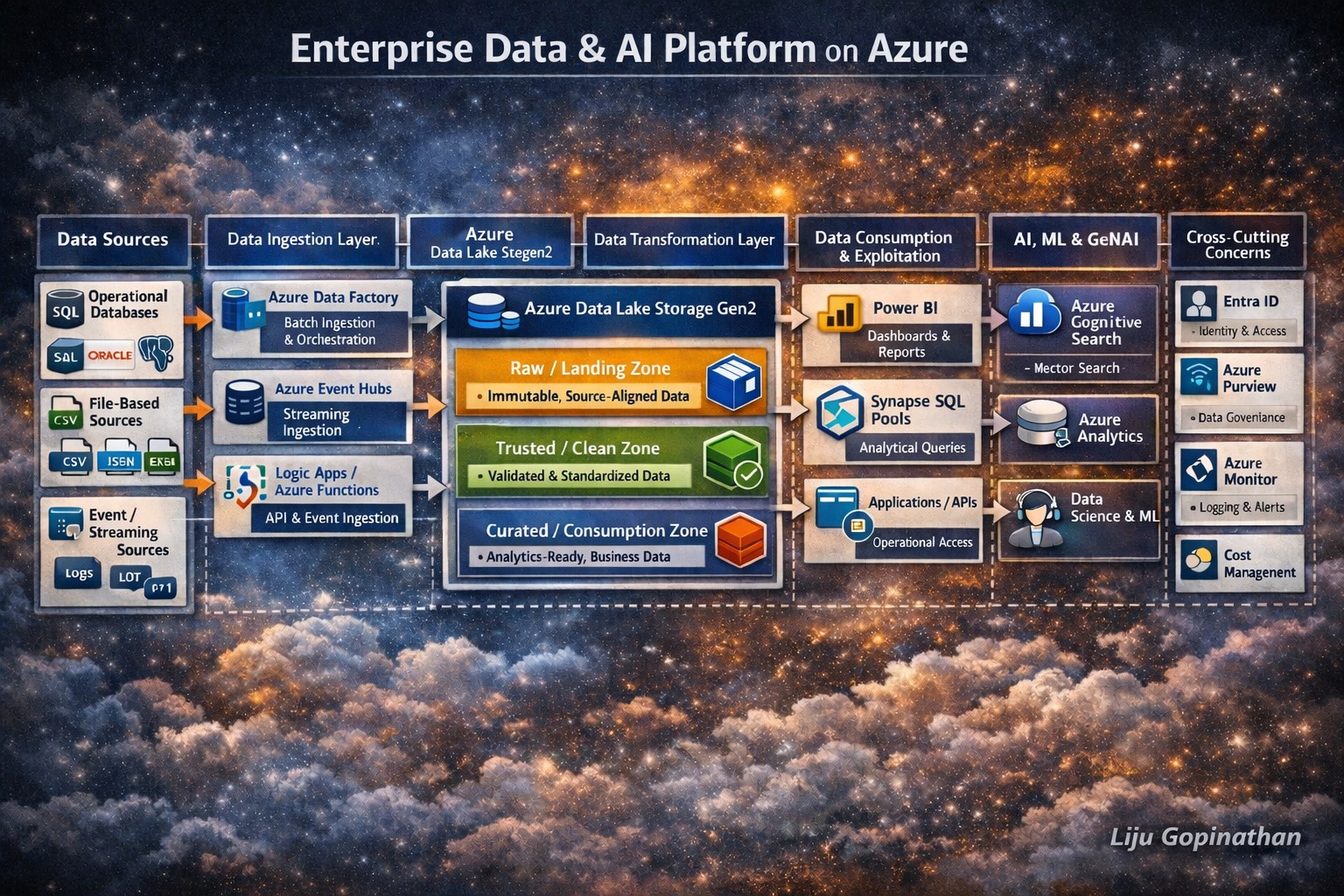
End-to-End Data Lifecycle Architecture Using Azure Native Services
Modern enterprises require more than isolated analytics or AI solutions. They need a cohesive, governed and scalable data platform that supports the entire data lifecycle from ingestion to transformation, analytics, machine learning and Generative AI.
The architecture illustrated above represents a holistic Enterprise Data & AI Platform built entirely using Azure native services. It demonstrates how data flows securely and reliably from multiple source systems, through structured processing layers and ultimately into consumption and AI/GenAI workloads.
This design reflects real-world enterprise patterns, aligned with regulated environments, cloud best practices and modern data platform principles.
Architectural Principles
This platform is designed around the following core principles:
- Separation of concerns across ingestion, storage, processing, and consumption
- Lakehouse-style architecture using Azure Data Lake as the backbone
- ELT-first approach (Extract → Load → Transform)
- Governance and security embedded at every layer
- AI and GenAI readiness by design, not as an afterthought
- Azure-native services only, ensuring long-term support and integration
1. Data Sources Layer
The data lifecycle begins with diverse enterprise data sources, which typically include:
- Operational DatabasesExamples: SQL Server, Oracle, PostgreSQLThese systems generate transactional and reference data critical for analytics and AI.
- File-Based SourcesFormats such as CSV, JSON, Excel, Parquet originating from internal systems, partners, or legacy platforms.
- SaaS & Application DataData exposed via REST APIs from CRM, ERP, ticketing, or third-party platforms.
- Event & Streaming SourcesApplication events, telemetry, logs, and IoT data produced continuously in near real time.
This layer is intentionally technology-agnostic, representing any system capable of producing data.
2. Data Ingestion Layer (Azure Native)
The ingestion layer is responsible for reliably moving data into Azure, without applying heavy business logic.
Azure Data Factory (ADF)
Azure Data Factory acts as the primary batch ingestion and orchestration service.
Key responsibilities:
- Scheduled and on-demand ingestion
- Source-to-lake data movement
- Pipeline orchestration and dependency management
- Metadata-driven ingestion patterns
ADF is deliberately used for data movement and orchestration, not complex transformations.
Azure Event Hubs
Azure Event Hubs supports streaming and real-time ingestion.
Typical use cases:
- Application logs
- Clickstream data
- IoT telemetry
- Event-driven business workflows
Event data is treated as a first-class citizen, landing in the same lake structure as batch data to ensure unified processing.
Azure Logic Apps & Azure Functions
These services enable API-based and event-driven ingestion.
They are used for:
- REST API integrations
- SaaS data ingestion
- Lightweight preprocessing
- Handling authentication, retries, and throttling
This pattern allows ingestion to remain loosely coupled and extensible.
3. Landing Zone – Azure Data Lake Storage Gen2
Azure Data Lake Storage Gen2 (ADLS Gen2) forms the central backbone of the platform.
It is organised into logical zones, each with a clear purpose.
Raw / Landing Zone
- Stores data exactly as received
- Immutable and append-only
- Preserves original structure and semantics
- Enables replay, audit, and lineage
No analytics or AI workloads directly access this zone.
Trusted / Clean Zone
- Basic data quality checks
- Schema validation and standardisation
- Removal of corrupt or invalid records
- Normalisation of formats
This zone represents technically reliable data, but not yet business-optimised.
Curated / Consumption Zone
- Business-aligned datasets
- Optimised storage formats (e.g., Parquet, Delta)
- Designed for analytics, ML, and GenAI consumption
- Domain- or subject-area oriented
This is the only zone exposed to downstream consumers.
4. Data Transformation & Processing Layer
Transformation is performed after data is safely landed, following an ELT model.
Azure Databricks
Azure Databricks is the primary large-scale transformation and feature engineering engine.
Responsibilities:
- Data cleansing and enrichment
- Complex joins and aggregations
- Incremental processing
- Feature creation for ML workloads
- Delta Lake-based reliability and versioning
Databricks supports both batch and streaming transformations, ensuring consistency across data types.
Azure Synapse Analytics
Azure Synapse complements Databricks by enabling:
- SQL-based analytical transformations
- Data modelling and serving
- Integration with BI tools
- Analytical views over curated datasets
Synapse acts as the bridge between data engineering and analytics.
5. Data Consumption & Exploitation Layer
Once data is curated, it becomes available for controlled and governed consumption.
Power BI
Used for:
- Enterprise reporting
- Dashboards
- Self-service analytics
Power BI connects only to curated and approved datasets.
Azure Synapse SQL Pools
Provide:
- High-performance analytical querying
- SQL access for analysts and applications
- Consistent semantic models
Applications & APIs
Curated data can be exposed via APIs to:
- Internal applications
- Downstream systems
- Operational reporting tools
Data Science & Advanced Analytics
Data scientists access curated datasets for:
- Exploratory analysis
- Feature experimentation
- Model development
Direct access to raw data is intentionally restricted.
6. AI, ML & Generative AI Enablement
The platform is designed to natively support AI and GenAI workloads.
Azure Machine Learning
Azure Machine Learning manages the full ML lifecycle:
- Training and experimentation
- Feature consumption
- Model registry
- Deployment and monitoring
It consumes governed, curated data, ensuring reproducibility and compliance.
Azure Cognitive Search
Azure Cognitive Search enables:
- Full-text search
- Semantic search
- Vector search for embeddings
It is a key component for Retrieval-Augmented Generation (RAG) patterns.
Azure OpenAI Service
Azure OpenAI provides LLM inference capabilities.
In a RAG pattern:
- Curated documents are indexed in Cognitive Search
- Relevant context is retrieved using vector search
- Context is passed to Azure OpenAI
- Grounded, auditable responses are generated
This ensures:
- Reduced hallucination
- Data boundary enforcement
- Enterprise-grade GenAI usage
7. Security, Governance & Observability (Cross-Cutting)
Security and governance span every layer of the architecture.
Microsoft Entra ID (Azure AD)
- Identity and access management
- Role-based access control (RBAC)
Managed Identities
- Secure service-to-service authentication
- No secrets embedded in code
Microsoft Purview
- Data catalog
- Lineage tracking
- Classification and governance
Azure Monitor & Log Analytics
- End-to-end observability
- Operational monitoring
- Troubleshooting and alerting
Cost Management
- Visibility into data and AI workloads
- Cost optimisation and governance
End-to-End Lifecycle Summary
This architecture illustrates a complete enterprise data lifecycle:
- Ingest data from any source
- Land it safely and immutably
- Transform it through governed layers
- Consume it via analytics and APIs
- Enable AI & GenAI using trusted data
- Secure and govern everything end-to-end
Why This Architecture Matters
This design demonstrates:
- Cloud-native best practices
- AI-first data platform thinking
- Strong governance and compliance
- Scalability and extensibility
- Real-world enterprise applicability
It moves beyond “data pipelines” into a true enterprise data and AI platform.
AI Mastery Roadmap 2026: A Comprehensive Learning Journey
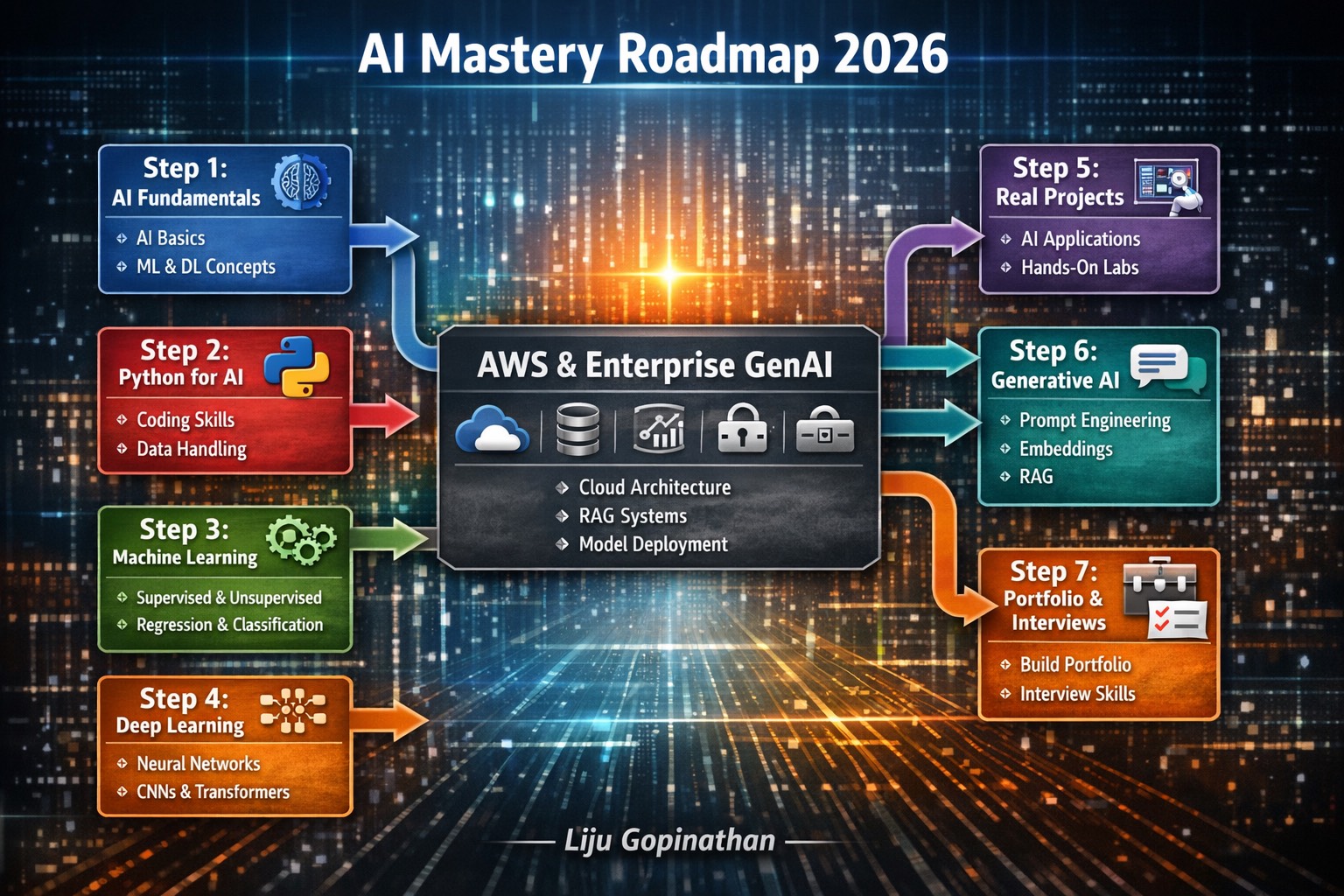
In today’s rapidly evolving AI landscape, mastering the field requires a structured, methodical approach. The “AI Mastery Roadmap 2026” infographic serves as a comprehensive guide, detailing the essential steps to become proficient in artificial intelligence. From foundational concepts to advanced enterprise applications, this roadmap encapsulates the entire journey.
Key Highlights:
- Step 1: AI Fundamentals – Start with the basics of AI, machine learning (ML) and deep learning (DL). This foundational layer ensures a solid understanding of core principles and prepares you for more complex topics.
- Step 2: Python for AI – Dive into Python, the cornerstone language for AI development. Learn coding skills and data handling techniques that are critical for building and deploying AI models.
- Step 3: Machine Learning – Explore the intricacies of ML, including supervised and unsupervised learning, regression and classification. This step empowers you to create predictive models and analyze data patterns.
- Step 4: Deep Learning – Delve into deep learning with neural networks, CNNs, and transformers. This phase introduces you to advanced model architectures, enabling you to tackle complex tasks like image recognition and natural language processing.
- Step 5: Real Projects – Apply your skills through hands-on AI projects. This practical experience solidifies your learning and showcases your ability to implement AI solutions in real-world scenarios.
- Step 6: Generative AI – Master generative AI techniques, including prompt engineering and Retrieval-Augmented Generation (RAG). Learn how to create innovative AI applications that generate content and provide intelligent responses.
- Step 7: Portfolio & Interviews – Build a robust portfolio and prepare for interviews. This final step focuses on showcasing your projects, refining your professional profile and excelling in AI-related job interviews.
Conclusion:
The “AI Mastery Roadmap 2026” is more than just a learning guide—it’s a strategic plan to elevate your AI expertise. By following this roadmap, you will gain the knowledge, skills and confidence needed to excel in the AI field.
Enterprise GenAI Platform on AWS: Building Secure and Scalable AI Solutions
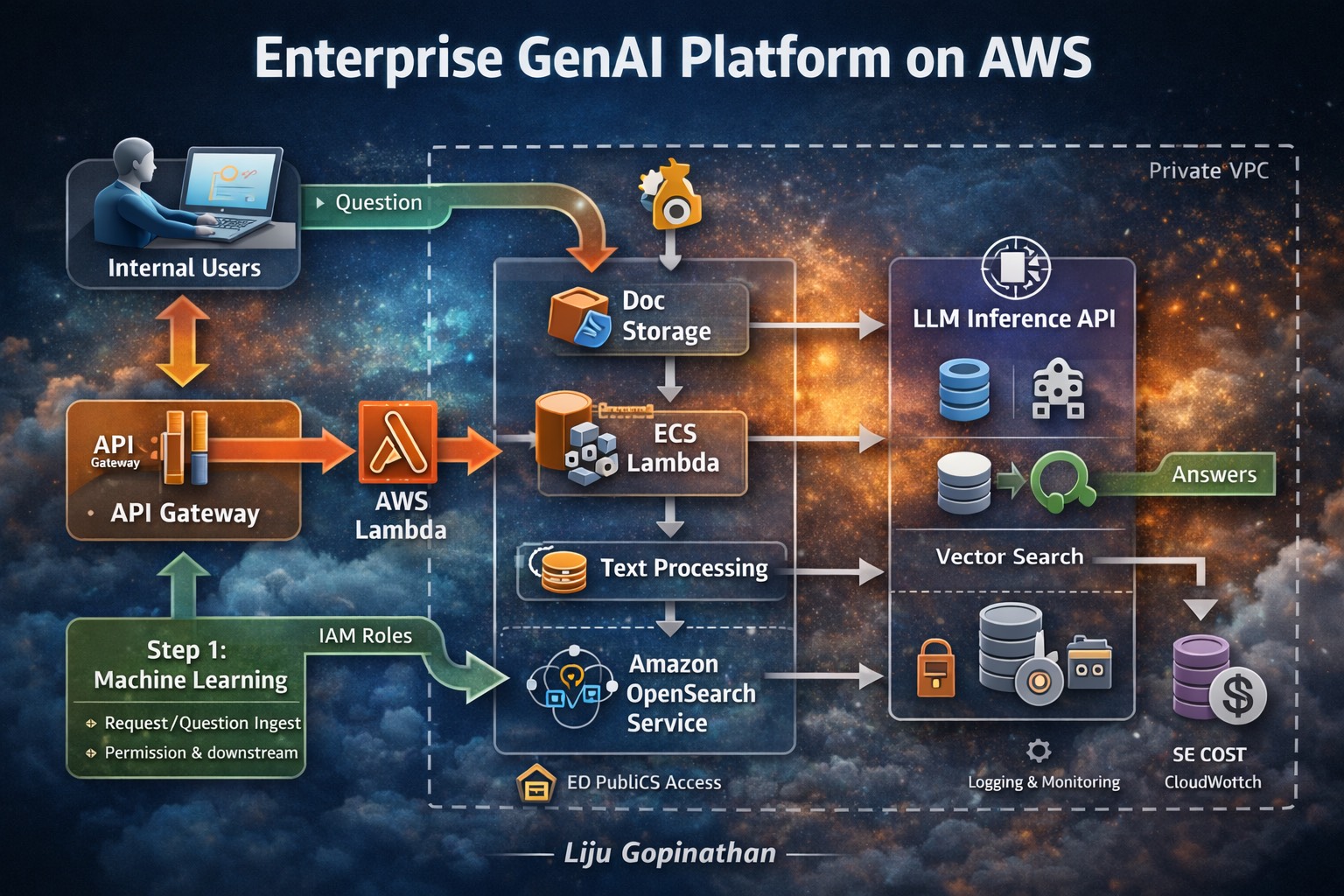
In the era of enterprise AI, the integration of Generative AI (GenAI) with robust cloud infrastructure is key to unlocking transformative business solutions. The “Enterprise GenAI Platform on AWS” infographic illustrates how a comprehensive Retrieval-Augmented Generation (RAG) system can be effectively built on AWS, ensuring security, scalability and efficiency.
Key Highlights:
- Internal Users: The platform begins with internal users, who initiate queries and requests, driving the need for intelligent and secure responses.
- API Gateway & AWS Lambda: The API Gateway serves as the entry point for user requests, routing them to AWS Lambda for processing. This serverless architecture ensures flexibility, scalability, and cost-efficiency.
- Document Storage & Text Processing: Documents are securely stored in AWS S3, and ECS Lambda functions handle text processing, ensuring that data is effectively ingested and prepared for retrieval.
- Amazon OpenSearch Service: For efficient search and retrieval, the platform leverages Amazon OpenSearch, allowing for quick and accurate vector searches across large datasets.
- LLM Inference API: The core of the GenAI platform is the LLM Inference API, which generates intelligent responses based on the retrieved data. This ensures that answers are both accurate and contextually relevant.
- Security & Cost Management: The entire platform operates within a private VPC, with IAM roles managing permissions. Monitoring and cost control are handled via AWS CloudWatch, ensuring that the system remains secure and cost-effective.
The “Enterprise GenAI Platform on AWS” infographic demonstrates the seamless integration of cutting-edge AI capabilities with AWS services. By adopting this architecture, enterprises can build secure, scalable, and intelligent AI solutions that drive business innovation and efficiency.
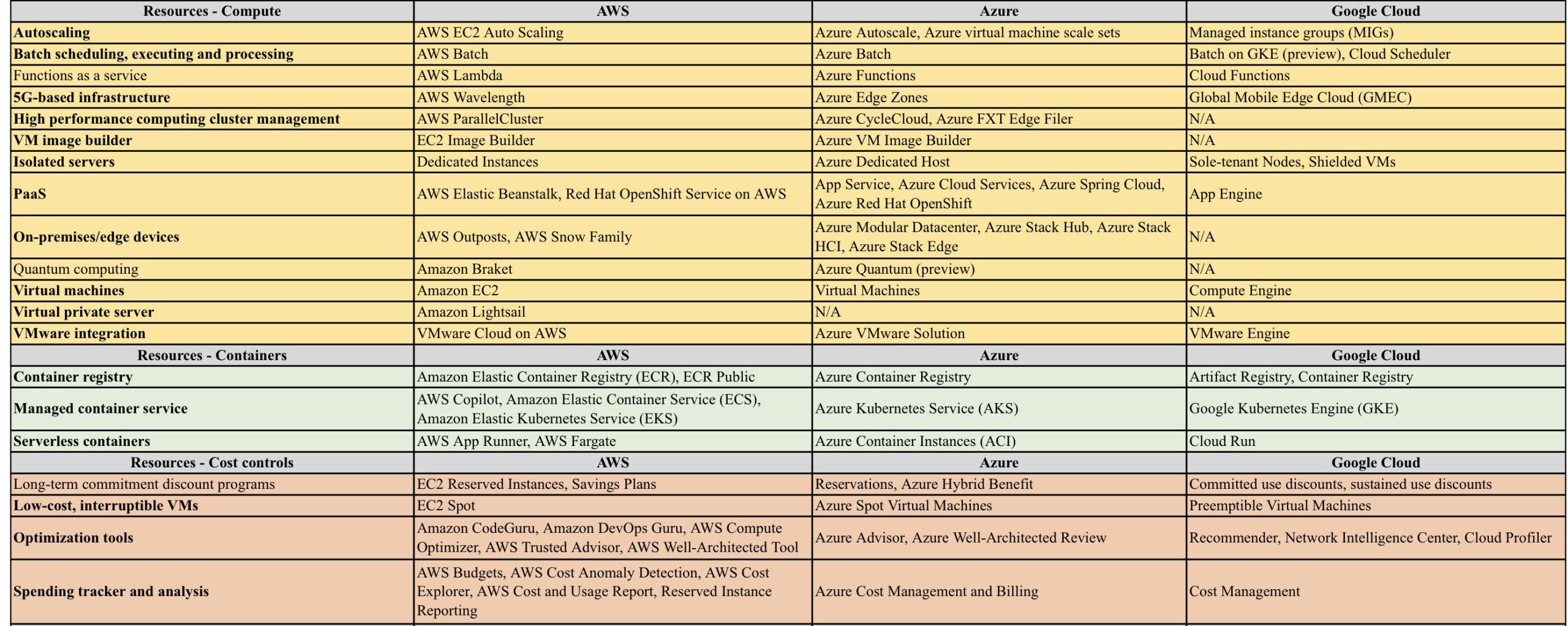
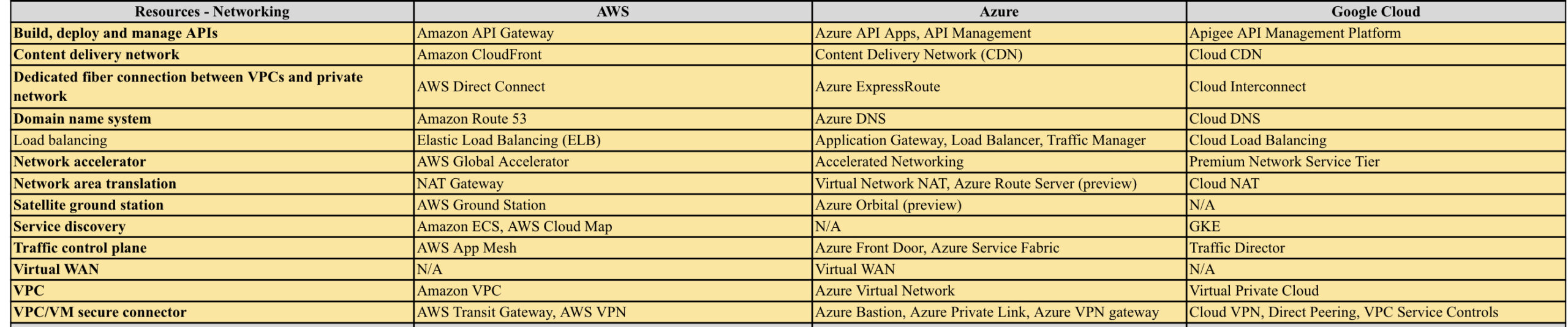
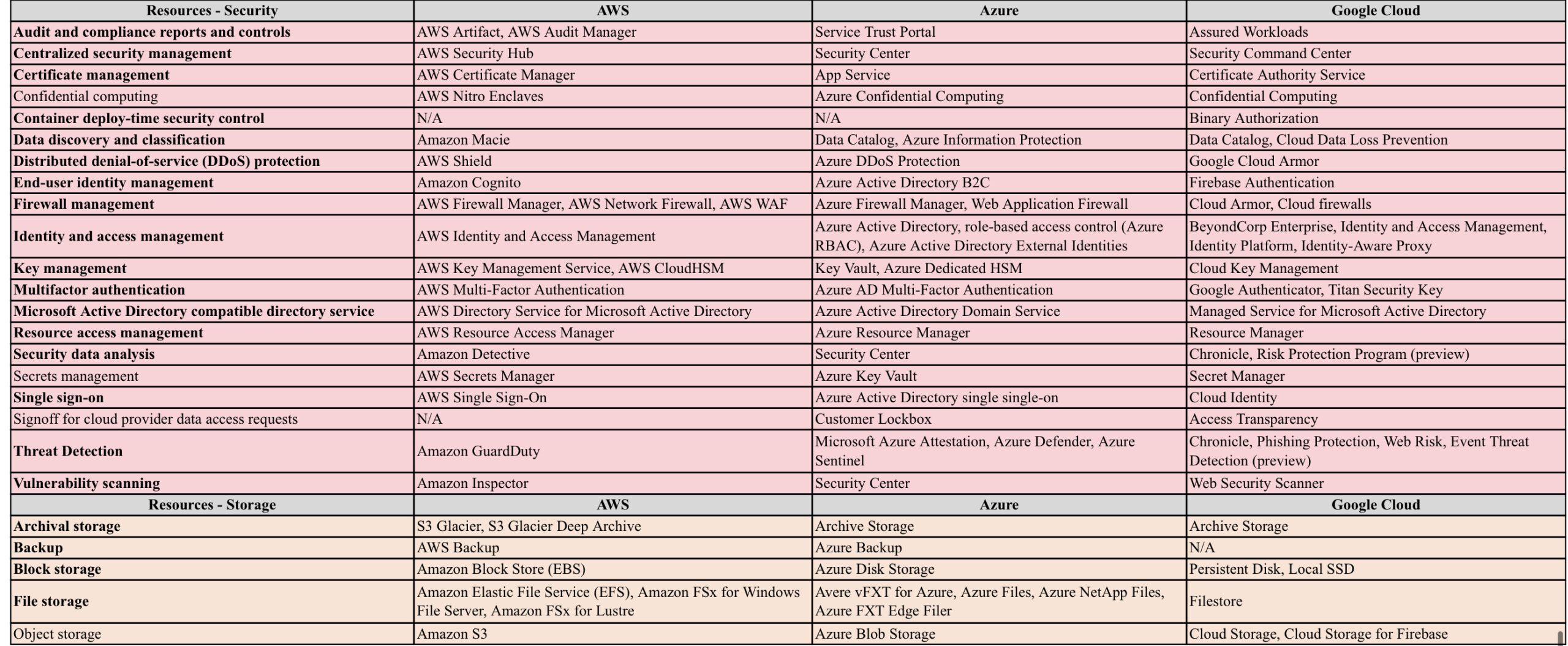
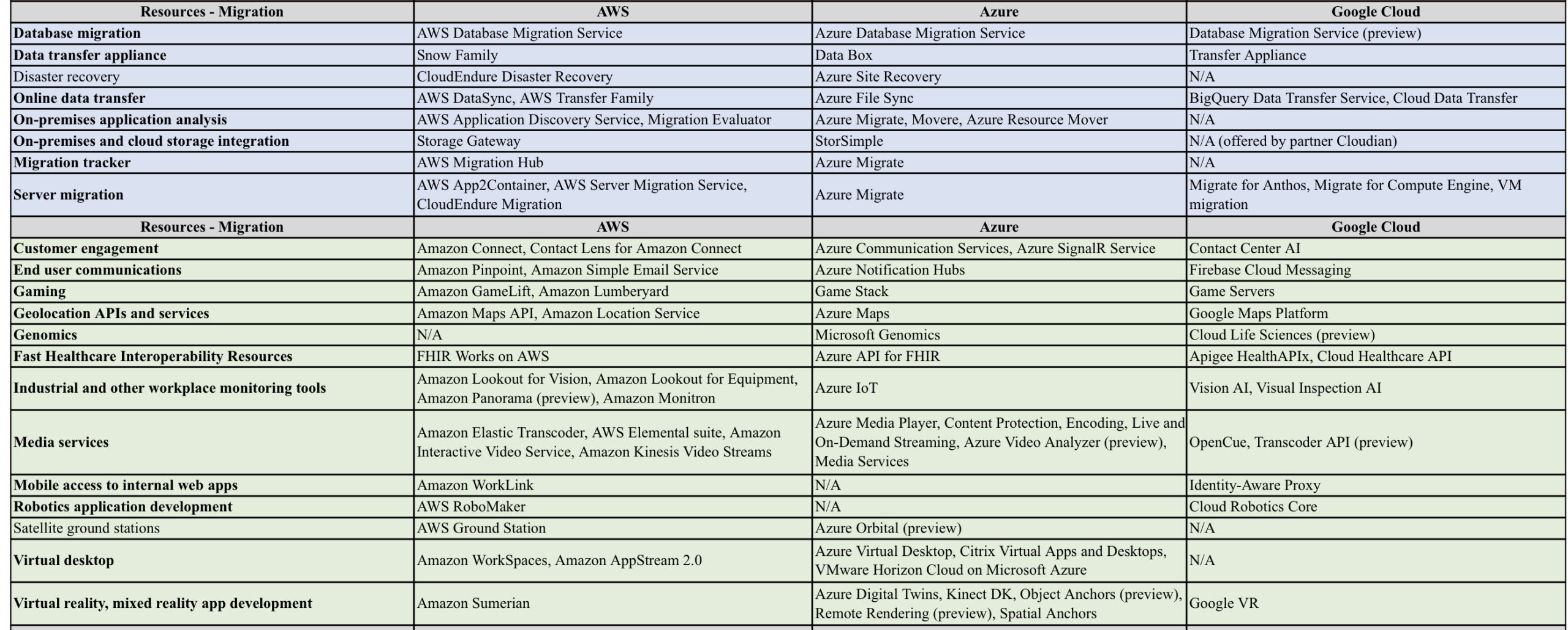
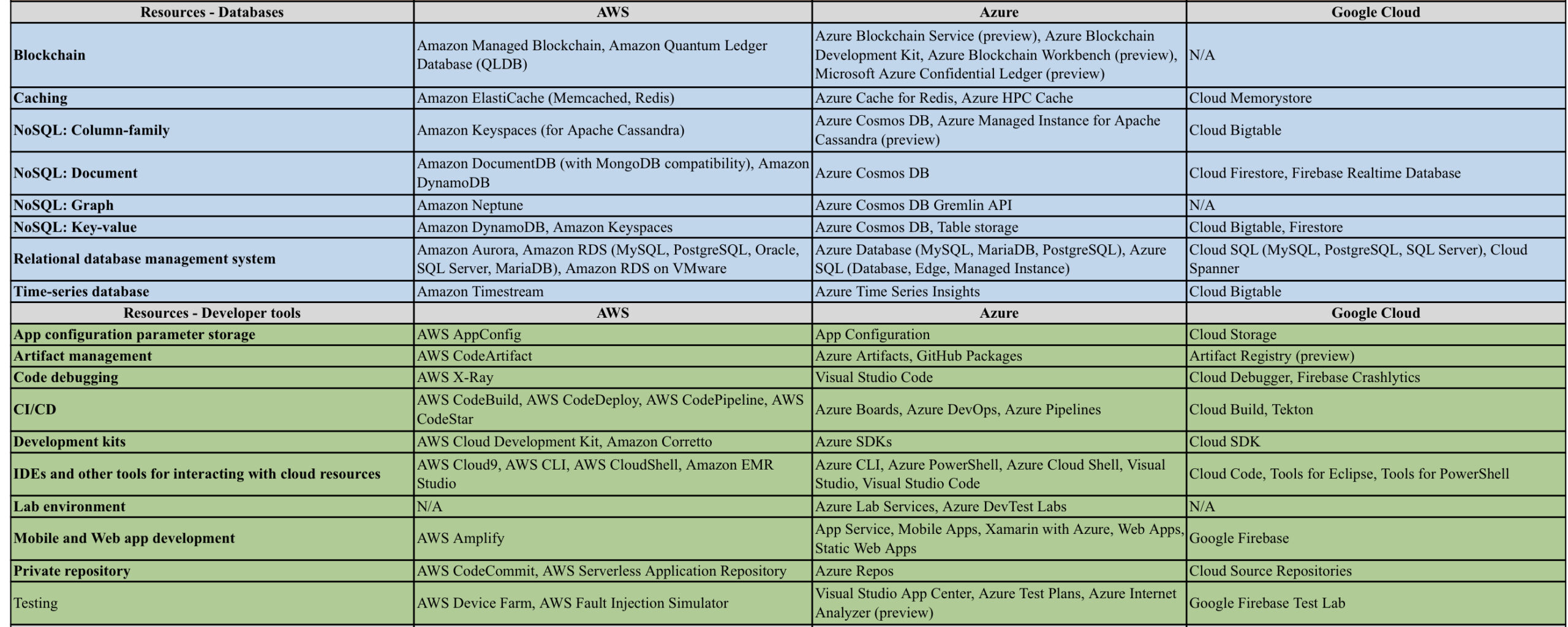
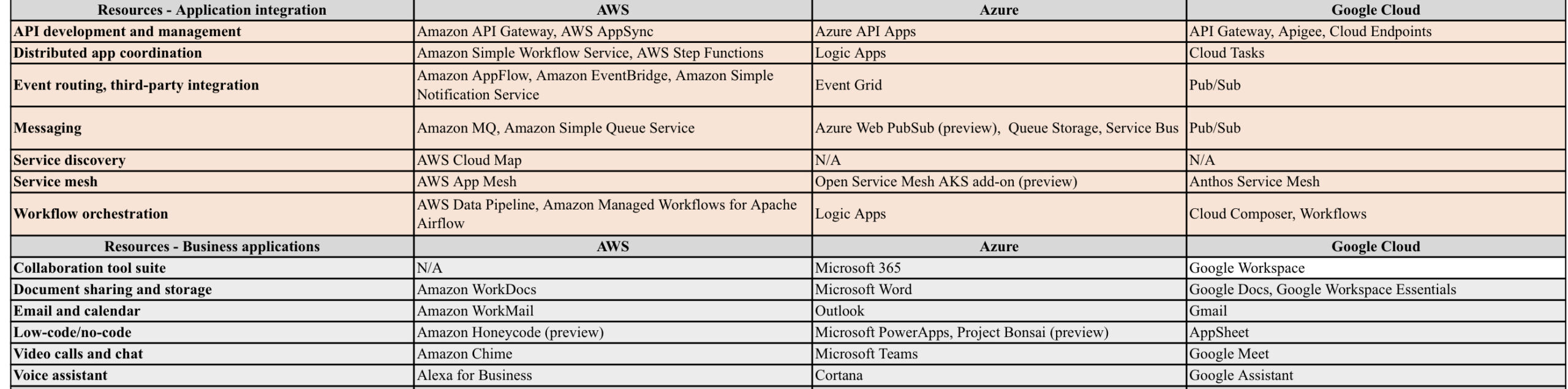
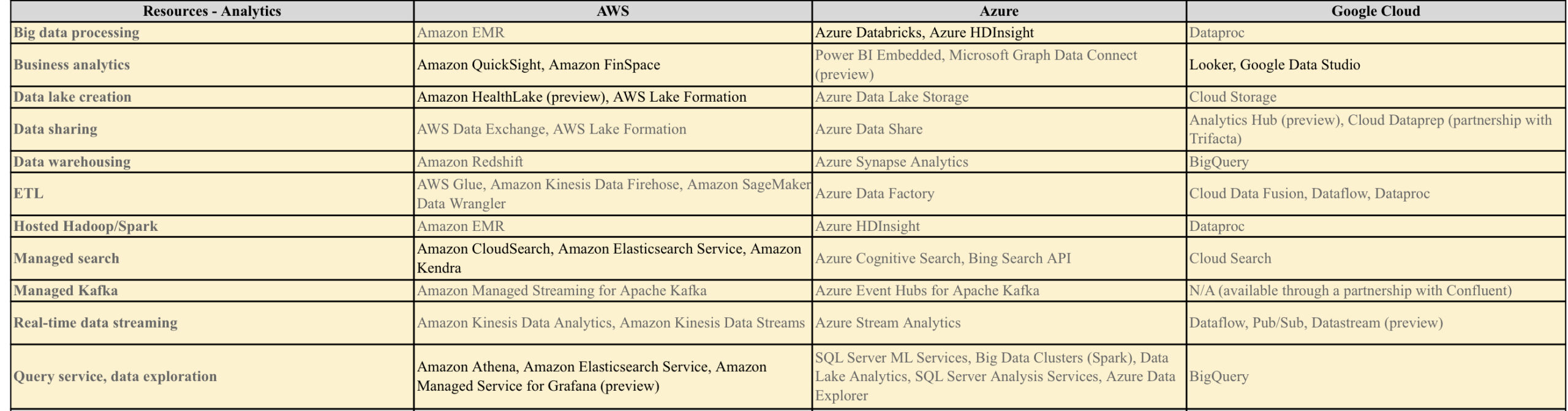
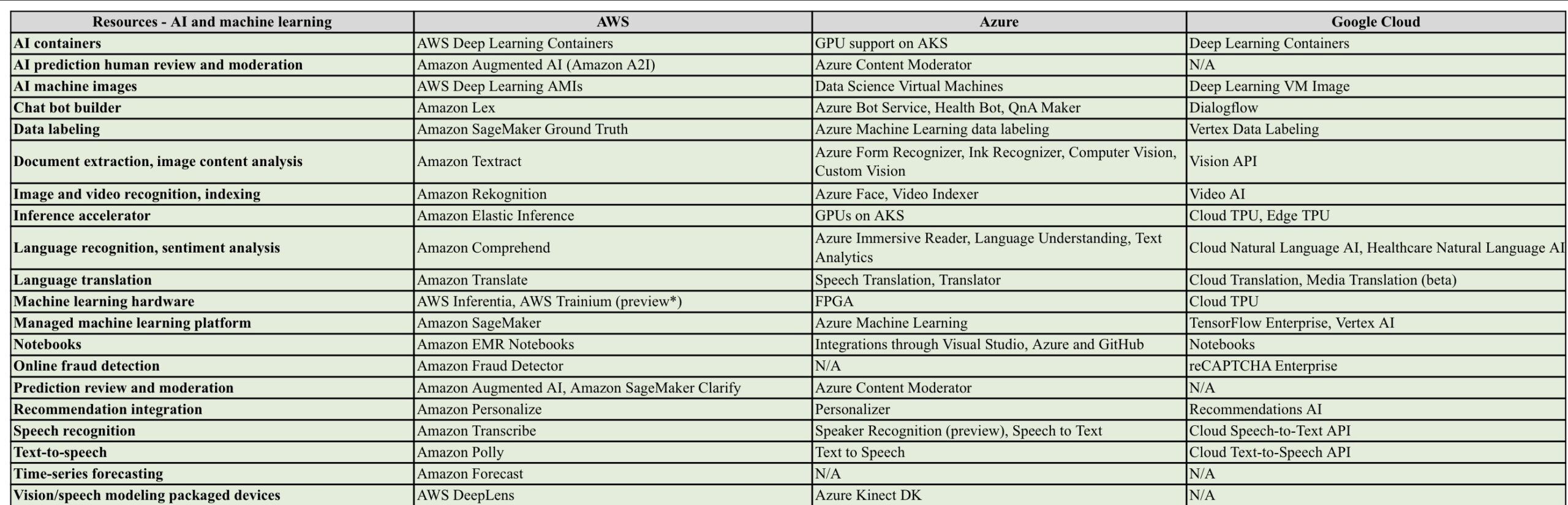
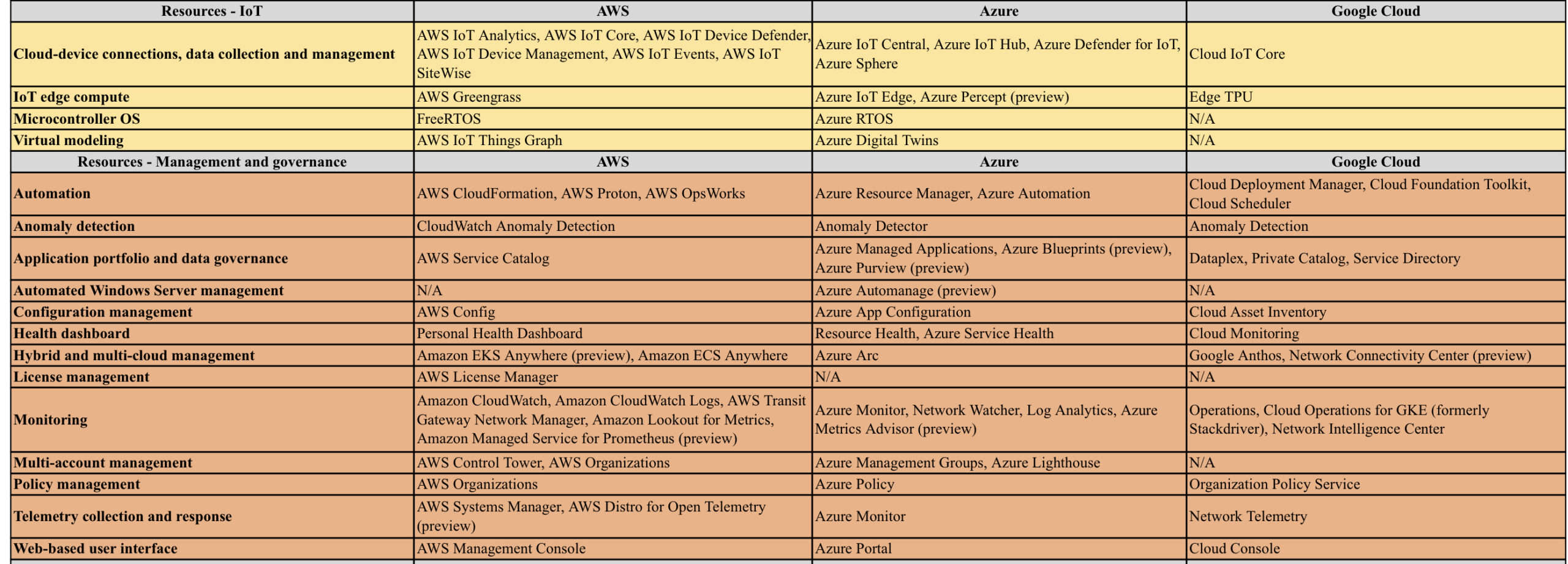
AWS vs Azure vs GCP
AWS/Azure/GCP provides a set of flexible services designed to enable companies to more rapidly and reliably build and deliver products using Cloud and DevOps practices. These services simplify provisioning and managing infrastructure, deploying application code, automating software release processes, and monitoring your application and infrastructure performance.
DevOps is the combination of cultural philosophies, practices, and tools that increases an organisations ability to deliver applications and services at high velocity, evolving and improving products at a faster pace than organisations using traditional software development and infrastructure management processes.
Microsoft Exchange to Office 365 Migration
Microsoft Exchange – Traditional Infrastructure with a standard layout
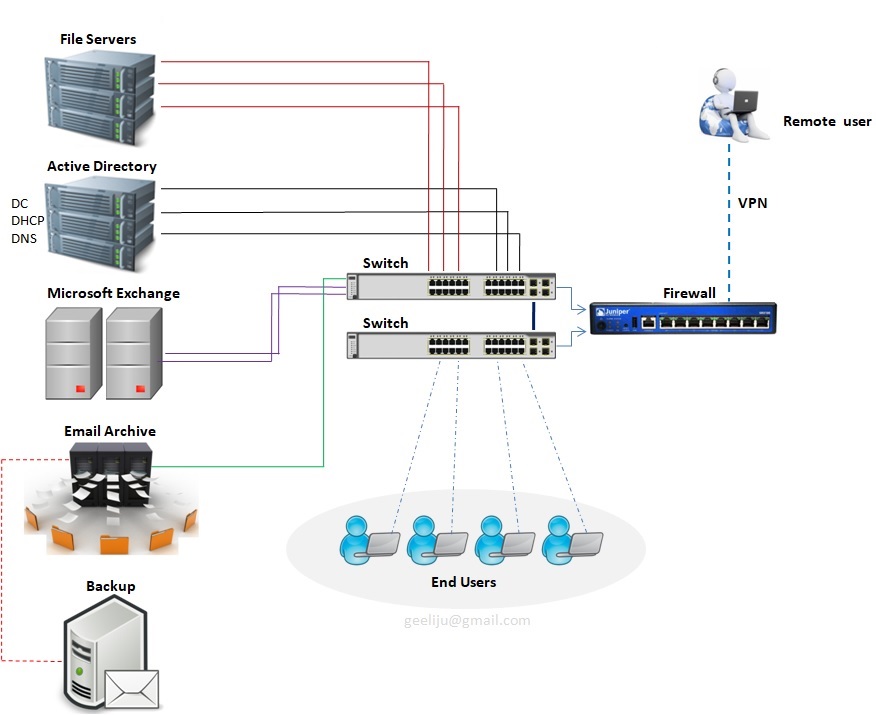
Please refer the above diagram. Starting at the top with File Servers which will serve multiple roles with in your environment. You will have User Home Drives, you will also have Shared Storage they can be utilized across your environment. Second you have Active Directory. This controls all your users and authentication both internally and your remote users utilizing VPN to connect in. You have your Exchange Server which is your email Server, that used to communicate both internally and across your environment as well as clients and your External users. Going along with Exchange you will also need a Email Archive to store all of your old email based on what ever retention policy you have set. And with that you need some sort of backup attached to that whether with Tape or Backup to Disks. Then you have all your End users utilizing all of your infrastructure internally.
Standard Challenges :
In the above example (diagram) we have 10 Physical Servers, which is a lot of maintenance for an individual with a setup of this size. Second thing to consider is your Server Migrations or Upgrade and that goes for Operating Systems or any kind of Software that are utilized within your environment. The third thing that you need to take into account is, all of these is required by the end users which means you have to have some sort of backup, Disaster Recovery or some sort of offsite usage capability. And the Final component that becomes a major challenge is Resources, where you have power cooling and network which is utilized by everyone of these devises.
Now that you have decided to MIGRATE, Whats NEXT ?
Evaluation >>
The first thing that you must do is to take a look at your environments to make sure that it supports the Cloud Based solution that you are investigating. So what you and team should be evaluating ?? Well, you need to start with –
1. Network Traffic Capabilities
2. The Internet Speed
3. Versions of Software both Server and User based
4. User Count
5. Data Size
6. The user roles and the needs of each one of those users
7. WHO and WHAT will be affected by this migration ?
8. When it comes to WHO, you should break things down by Departments, User Type, Location and Primary Work Location.
9. When it comes to WHAT, you should make a list of what would change and how it would change. Not just for your user but also for you as the Administrator.
Everything will be affected in your network from where your files are stored and how your users authenticate to specific resources, where the Mail Flow comes from, how things are archived and how your remote users interact with your network and the resources use to be inside your network.
Then you need to evaluate licensing needs. Based on the list that you made you should be able to determine the licensing needs of those users. One of the best updates made to O365 was the ability to mix and match the licensing, which means you are no longer bound to use one type of license to all of your users which can be a huge cost saving benefit to you environment.
Migration Options >>
Different types of migrations that you can utilize in your environment.
1. Remote Move Migration – You use this for 2 reasons.
a > If you are going to do an Exchange Hybrid Deployment with mailboxes both On premise and Cloud based OR
b > If you are going to move mailboxes over a long period of time, this is supported by Exchange 2010 and later or if you have more than 2000 Mail boxes.
2. Stage Migration – Use use this if you are planning to move all of your mail boxes to Exchange Online over a period of time but this option is only supported on Exchange 2003 or 2007.
3. Cut Over Migration – This is a short term migration where users will be migrated in one batch and then cut over in a single swoop. This is used for 2000 or Less mail boxes and the users identity will be managed in O365.
4. IMAP Migration – This is used for other types of messaging systems other than Exchange such as AOL, Lotus, Google mail etc.
So what now that we know, what type of migrations exists, lets looks at how the infrastructure Cloud look like and how the migration data will flow.
Infra migration plan and Data flow >>
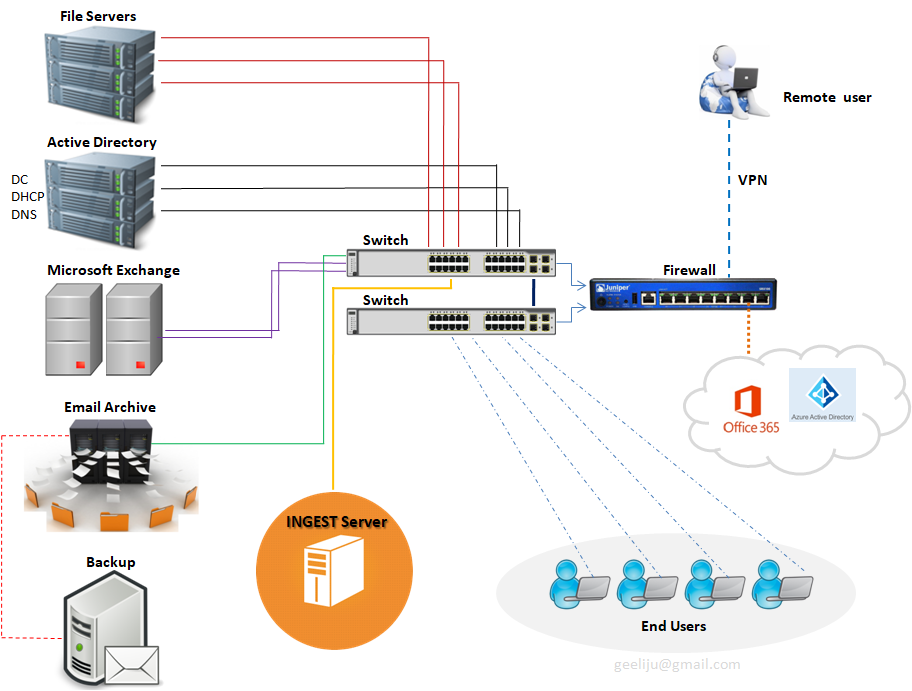
Lets start with one of the components which has actually been added called “INGEST SERVER“. Basically what this Ingest server during your migration is it will take your mail out of exchange, process it and then upload into your Office 365 Tenant. The purpose of this design is however to make sure that during the migration process which normally happens during business hours is not taxing to your servers and doesn’t affect your end users. At what point this suggested infrastructure get moved ?? All of this get taken out once you are ready to do your final cut over to your Cloud based solution.
Now lets take a look at the environment Post Migration >>
This first thing that you will notice is the decreased amount of infrastructure for you to manage, maintain and upgrade. This leads to increased operational efficiency. So how do we do that ? Lets start with our File Server.
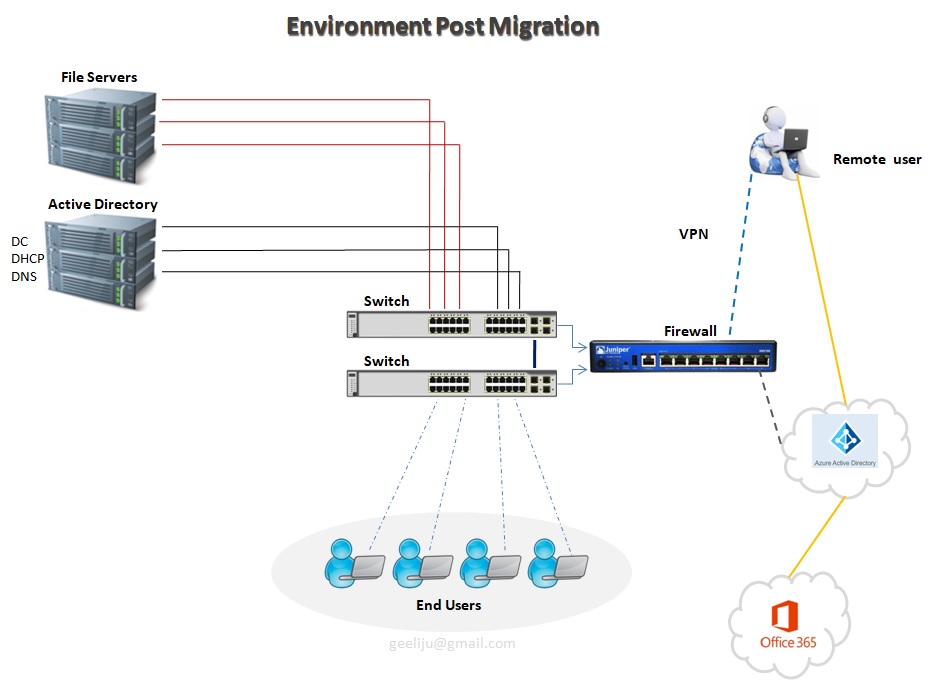
In our example we have only got 3 File servers. Basically, now what we have done is we have now taken all of our shared files and we moved them to Share Point Online and Office365. Then we have taken all of our user’s home drives and we have moved them to OneDrive for Business and Office365.
We have only a single Active Directory Server in this example, but we do have a possibility of Second depending on the amount load and that you need for internal based Applications. But for our purposes, we will only utilized one. All of your Remote users and everyone who is accessing the Cloud Based Services is authenticating to your Azure Active Directory as pause to your internal Active Directory. Those two synchronize together, so every time a user changes his password internally, it automatically updates in Office365. One of the Biggest component that you will notice missing is your Exchange Server and the need for your mail archive. Neither one of those are needed because are resources handled by Office365 as well. Your Remote users are not fully connected to your environment at all times. They are authenticating directly to Azure Active Directory utilizing all of these Cloud based Services that you moved out here (Office365 + Azure AD). As a matter of fact the only reason that these remote users will need to connect to your internal environment is just in case of any internal based Applications to be accessed..
O365 – >>
OpenStack ‘Mitaka’ installation on CentOS 7
OpenStack is a Cloud Software that manage large pool of compute (hypervisors), storage ( block & swift ) and network resources of a data center.
It provides a Dashboard where admins can create and manage Projects (Tenants ) and give appropriate access to the project members , further on Project members can create VMs (Virtual Machine).
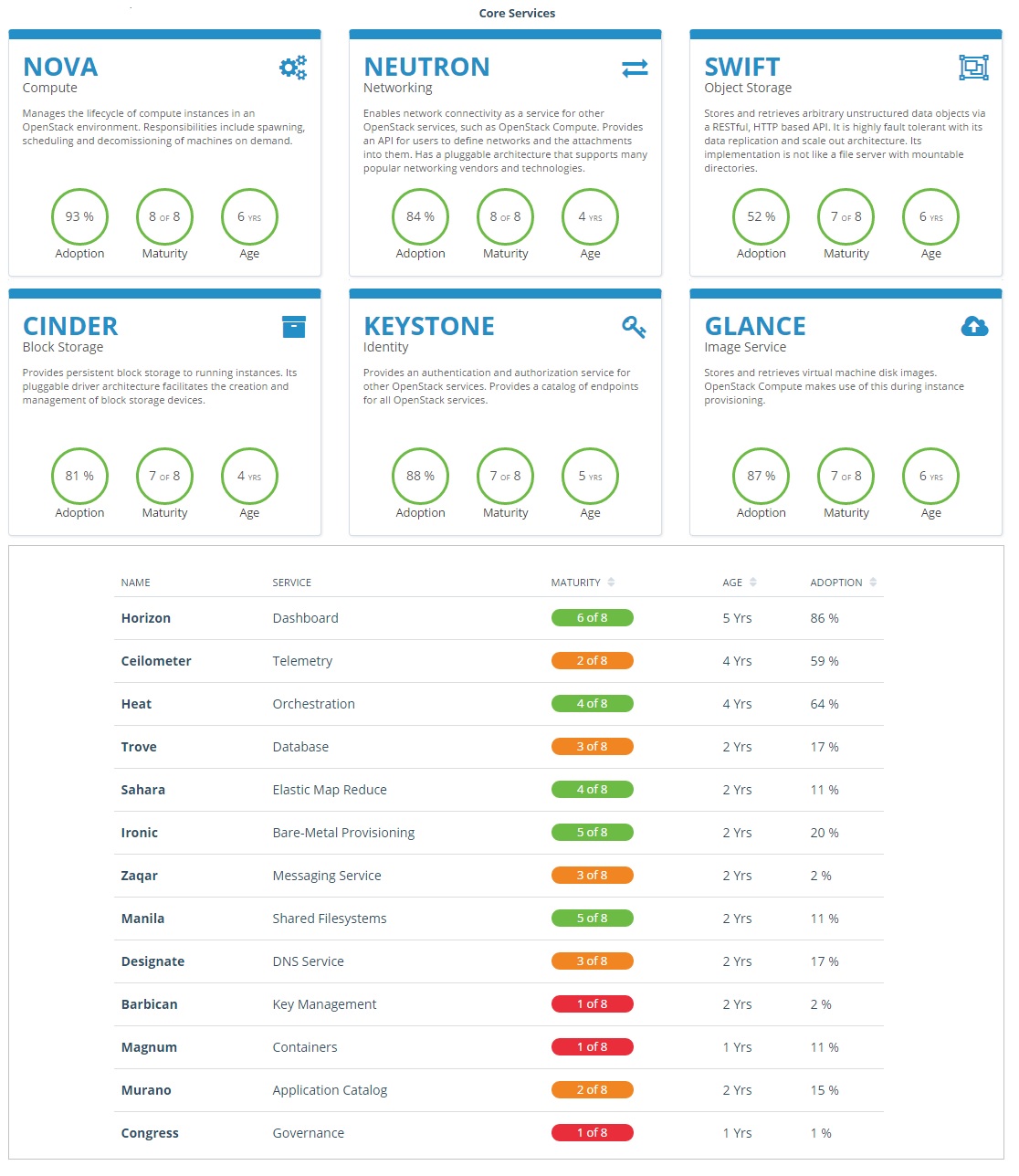
OpenStack consists of several Services/Projects that are separately installed depending on your cloud needs like –
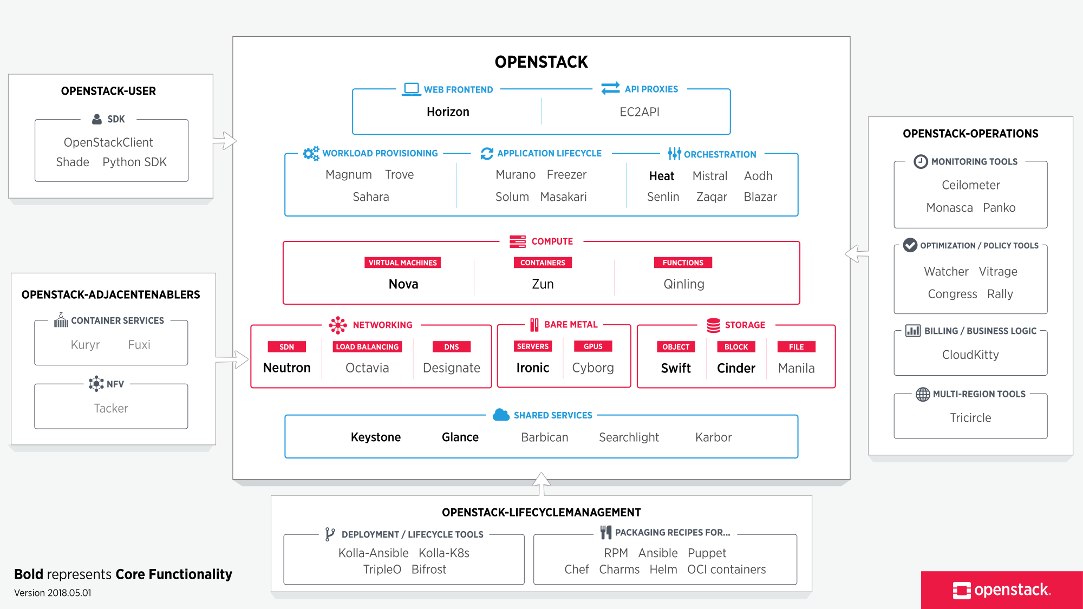
You can install any of these projects separately and configure them ‘stand-alone’ or as connected entities.
The OpenStack project is an open source cloud computing platform that supports all types of cloud environments. The project aims for simple implementation, massive scalability, and a rich set of features. Cloud computing experts from around the world contribute to the project. OpenStack provides an Infrastructure-as-a-Service (IaaS) solution through a variety of services.
Each service offers an Application Programming Interface (API) that facilitates this integration.
After becoming familiar with basic installation, configuration, operation, and troubleshooting of these OpenStack services, you should consider the following steps towards deployment using a Production Architecture:
- Determine and implement the necessary core and optional services to meet performance and redundancy requirements.
- Increase Security using methods such as Firewalls, Encryption, and Service Policies.
- Implement a deployment tool such as Ansible, Chef, Puppet, or Salt to automate deployment and management of the production environment.
Single Node OpenStack ‘ MITAKA ’ installation Steps on CentOS 7 using RDO repositories (Packstack)
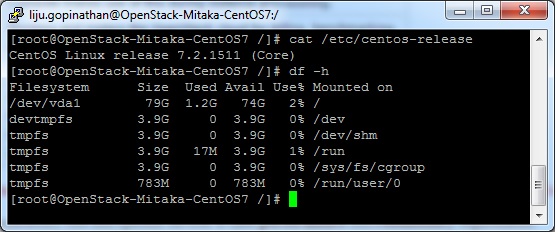
Set the following steps:
1. Hostname to OpenStack-Mitaka-CentOS7
2. Selinux in Permissive Mode >> Edit the selinux config file ( /etc/sysconfig/selinux ) and set “SELINUX=permissive”
3. Disable firewalld & NetworkManager Service
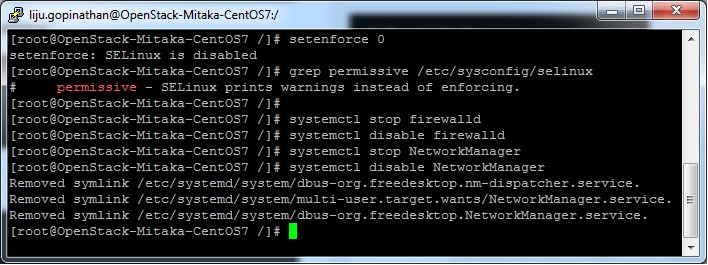
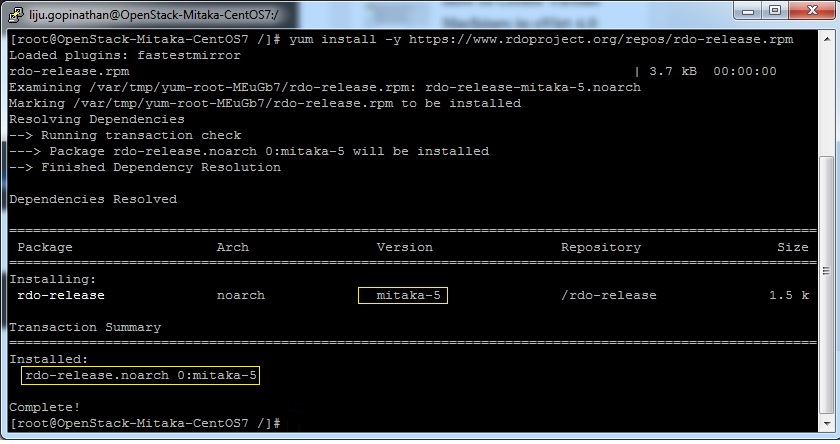
4. Update the system and enable RDO Repository for MITAKA packages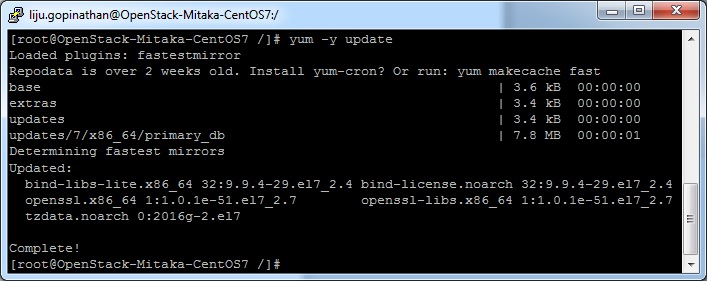
5. Check the yum repolist to varify the repo details and then install OpenStack PackStack Package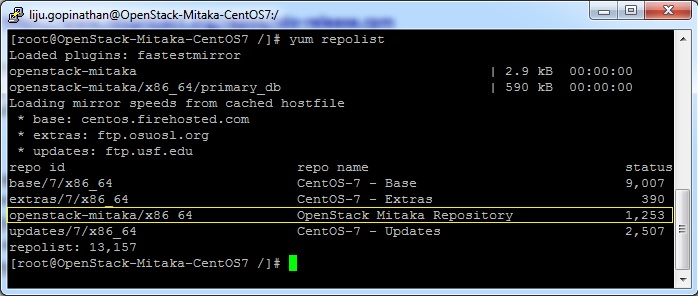
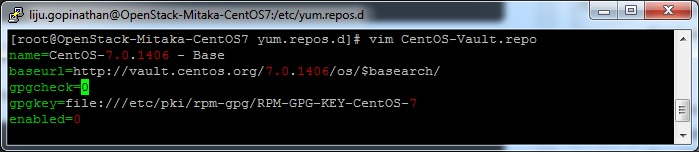
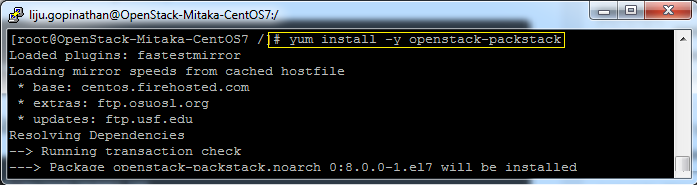
Once the Packstack installation is done we will deploy OpenStack. Packstack can be installed in 3 ways :
a. packstack
b. packstack –allinone
c. packstack –gen answer-file=/path ( The easiest way to install Packstack )**
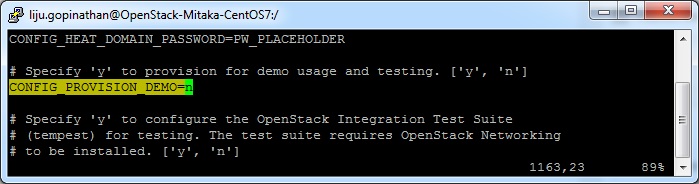
Generate the answer file using the command #packstack –gen-answer-file=/root/answer.txt and the edit the answer file “/root/answer.txt”.
Change the following parameters and ignore the rest.
CONFIG_PROVISION_DEMO=n
CONFIG_KEYSTONE_ADMIN_PW=letslearntogether
CONFIG_HORIZON_SSL=n
CONFIG_NAGIOS_INSTALL=n
6. OpenStack installation using answer file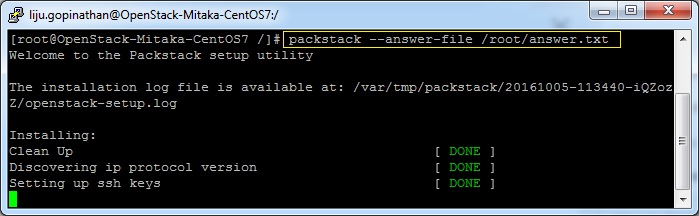
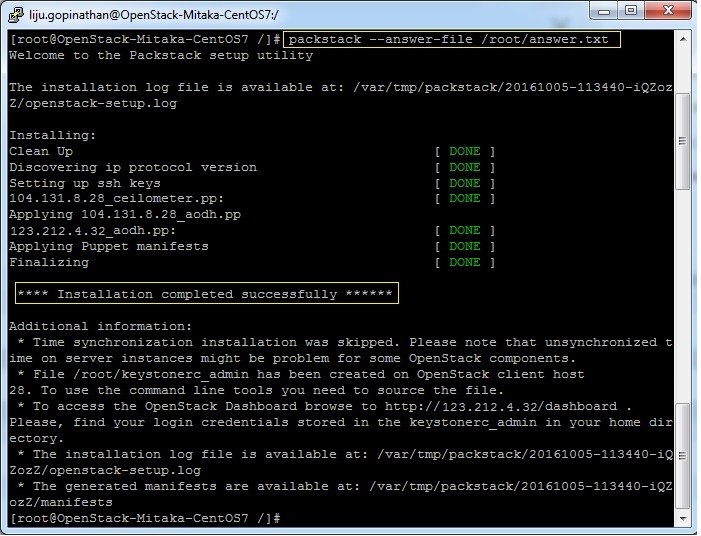
This completes the OpenStack installation. A new interface called “br-ex” will be created and assign the IP addess of eth0 or enp0s3 to br-ex.
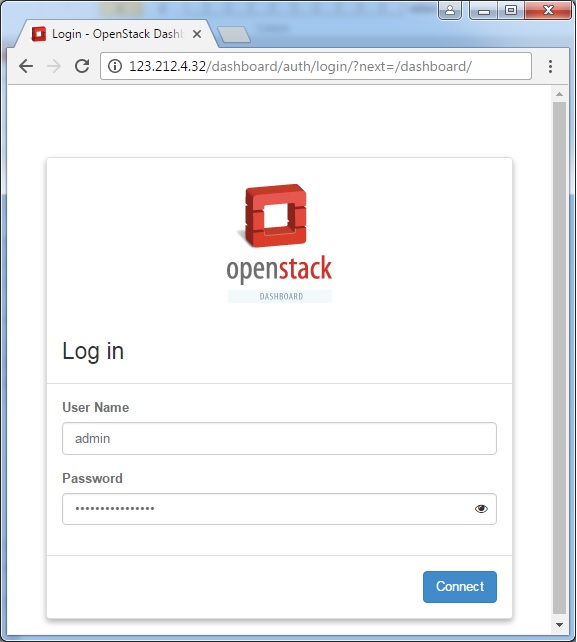
You can now access OpenStack Dashboard using https://123.212.4.32/dashboard
Happy Learning !!
Splunk on CentOS 7
Pre-requisites for the installations – Recommend a proper hostname, firewall and network configuration for the server prior to the installations.
Splunk supports only 64 bit Server Architecture.
Create a Splunk User
It is always recommended to run this application as its dedicated user rather than as root.
Create a user to run this application and create an application folder for the installation.
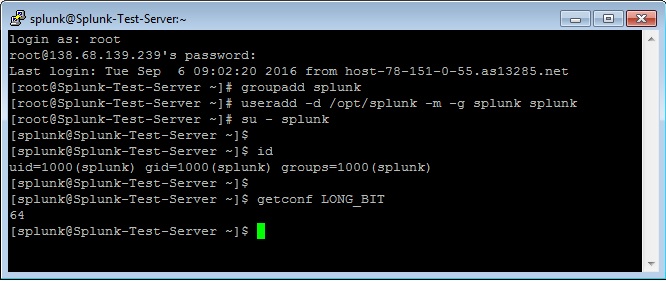
login as: root
root@ Splunk-Test-Server’s password:****
Last login: Tue Sep 6 09:02:20 2016 from host-78-151-0-55.as13285.net
[root@Splunk-Test-Server ~]# groupadd splunk
[root@Splunk-Test-Server ~]# useradd -d /opt/splunk -m -g splunk splunk
[root@Splunk-Test-Server ~]# su – splunk
[splunk@Splunk-Test-Server ~]$
[splunk@Splunk-Test-Server ~]$ id
uid=1000(splunk) gid=1000(splunk) groups=1000(splunk)
[splunk@Splunk-Test-Server ~]$
To Confirm the Server Architecture
[splunk@Splunk-Test-Server ~]$ getconf LONG_BIT
64
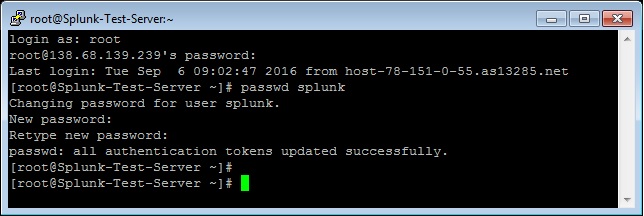
[root@Splunk-Test-Server ~]# passwd splunk
Changing password for user splunk.
New password: ****
Retype new password: ****
passwd: all authentication tokens updated successfully.
[root@Splunk-Test-Server ~]#
Download and extract the Splunk Enterprise version
Create a Splunk account and download the Splunk software from their official website here.
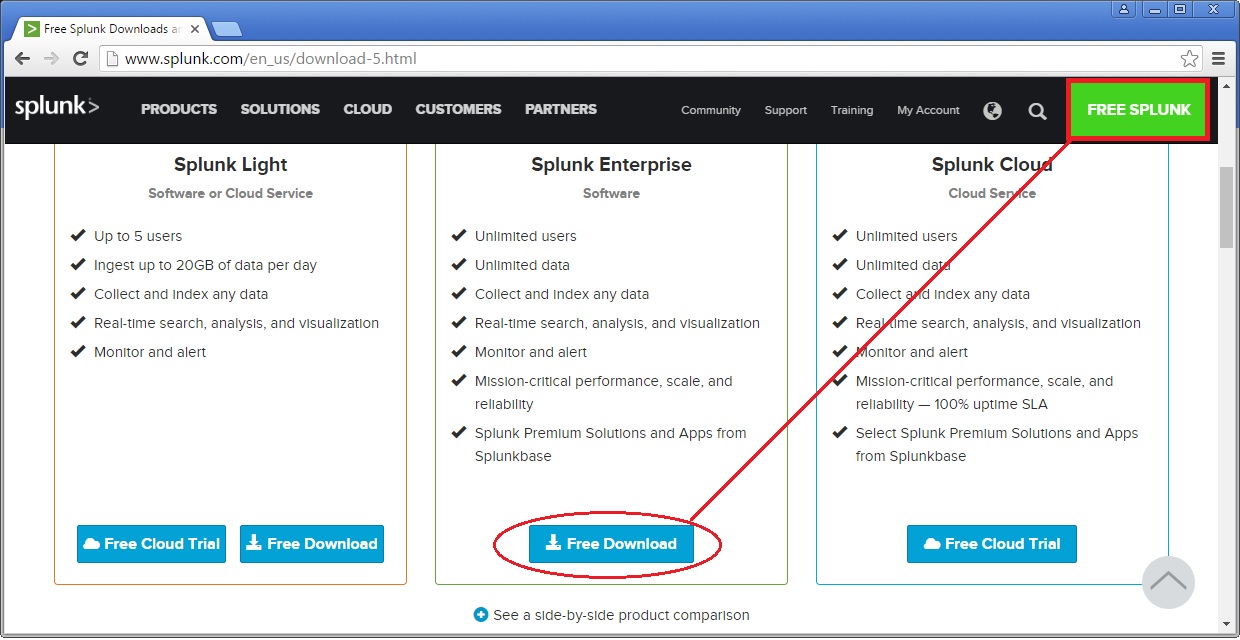
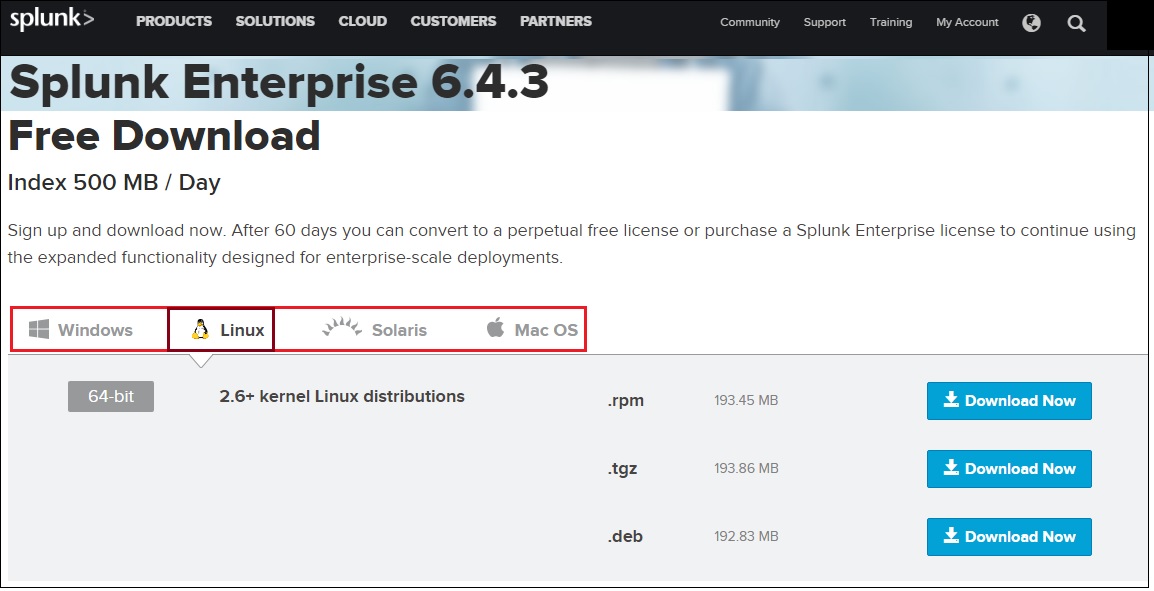
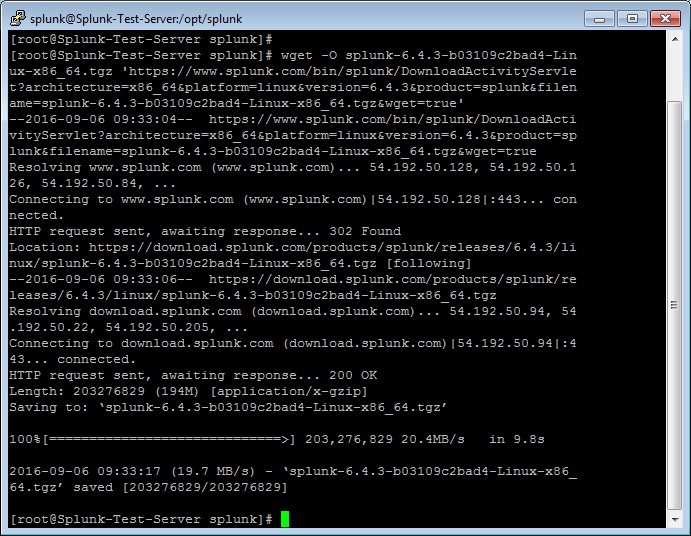
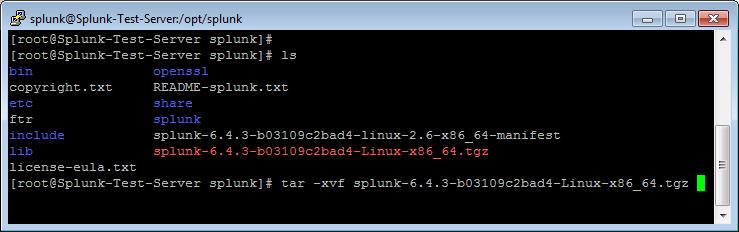
Now extract the tar file and copy the files to the Splunk application folder namely /opt/splunk created.
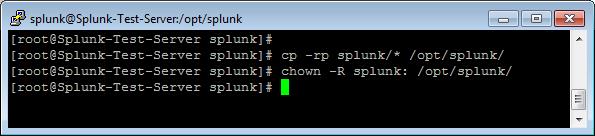
Splunk Installation
Once the Splunk software is downloaded, you can login to your Splunk user and run the installation script. We will choose the trial license, so it will take it by default.
[root@Splunk-Test-Server splunk]# su – splunk
Last login: Tue Sep 6 09:21:18 UTC 2016 on pts/1
[splunk@Splunk-Test-Server ~]$
[splunk@Splunk-Test-Server ~]$ cd bin/
[splunk@Splunk-Test-Server bin]$ ./splunk start –accept-license
This appears to be your first time running this version of Splunk.
Copying ‘/opt/splunk/etc/openldap/ldap.conf.default’ to ‘/opt/splunk/etc/openldap/ldap.conf’.
Generating RSA private key, 1024 bit long modulus
………………………………………………….++++++
e is 65537 (0x10001)
writing RSA key
Generating RSA private key, 1024 bit long modulus
e is 65537 (0x10001)
writing RSA key
Moving ‘/opt/splunk/share/splunk/search_mrsparkle/modules.new’ to ‘/opt/splunk/share/splunk/search_mrsparkle/modules’.
Splunk> See your world. Maybe wish you hadn’t.
Checking prerequisites…
Checking http port [8000]: open
Checking mgmt port [8089]: open
Checking appserver port [127.0.0.1:8065]: open
Checking kvstore port [8191]: open
Checking configuration… Done.
Creating: /opt/splunk/var/lib/splunk
Creating: /opt/splunk/var/run/splunk
Creating: /opt/splunk/var/run/splunk/appserver/i18n
Creating: /opt/splunk/var/run/splunk/appserver/modules/static/css
Creating: /opt/splunk/var/run/splunk/upload
Creating: /opt/splunk/var/spool/splunk
Creating: /opt/splunk/var/spool/dirmoncache
Creating: /opt/splunk/var/lib/splunk/authDb
Creating: /opt/splunk/var/lib/splunk/hashDb
Checking critical directories… Done
Checking indexes…
Validated: _audit _internal _introspection _thefishbucket history main summary
Done
New certs have been generated in ‘/opt/splunk/etc/auth’.
Checking filesystem compatibility… Done
Checking conf files for problems…
Done
Checking default conf files for edits…
Validating installed files against hashes from ‘/opt/splunk/splunk-6.4.3-b03109c2bad4-linux-2.6-x86_64-manifest’
All installed files intact.
Done
All preliminary checks passed.
Starting splunk server daemon (splunkd)…
Generating a 1024 bit RSA private key
……………………………++++++
writing new private key to ‘privKeySecure.pem’
Signature ok
subject=/CN=Splunk-Test-Server/O=SplunkUser
Getting CA Private Key
writing RSA key
Done
[ OK ]
Waiting for web server at http://127.0.0.1:8000 to be available… Done
If you get stuck, we’re here to help.
Look for answers here: http://docs.splunk.com
The Splunk web interface is at http://Splunk-Test-Server:8000
[splunk@Splunk-Test-Server bin]$
The Splunk web interface is at http://splunk@Splunk-Test-Server:8000
Access your Splunk Web interface at http://IP:8000/ or http://hostname:8000. Confirm the port 8000 is open in your server firewall.
Configuring Splunk Web Interface
This completes installation and now Splunk Service up & running in your server.
Next step is to set-up Splunk Web interface.
Access Splunk web interface and set administrator password.
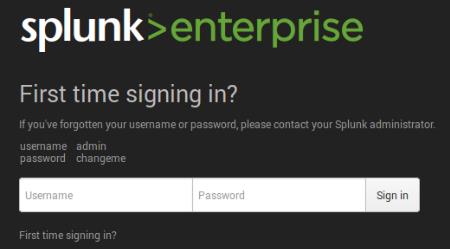
First time when you’re accessing the Splunk interface, you can use the user/password provided in the page which is admin/changeme in this case. Once logged in, on the very next page it will ask to change and confirm your new password.
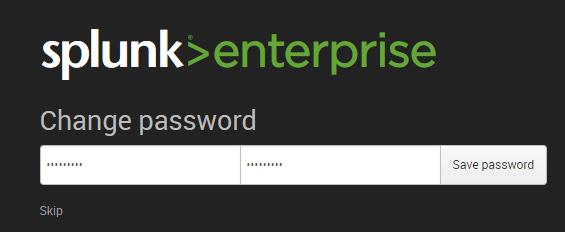
Now start using the Splunk Dashboard !!
https://www.splunk.com/web_assets/v5/book/Exploring_Splunk.pdf
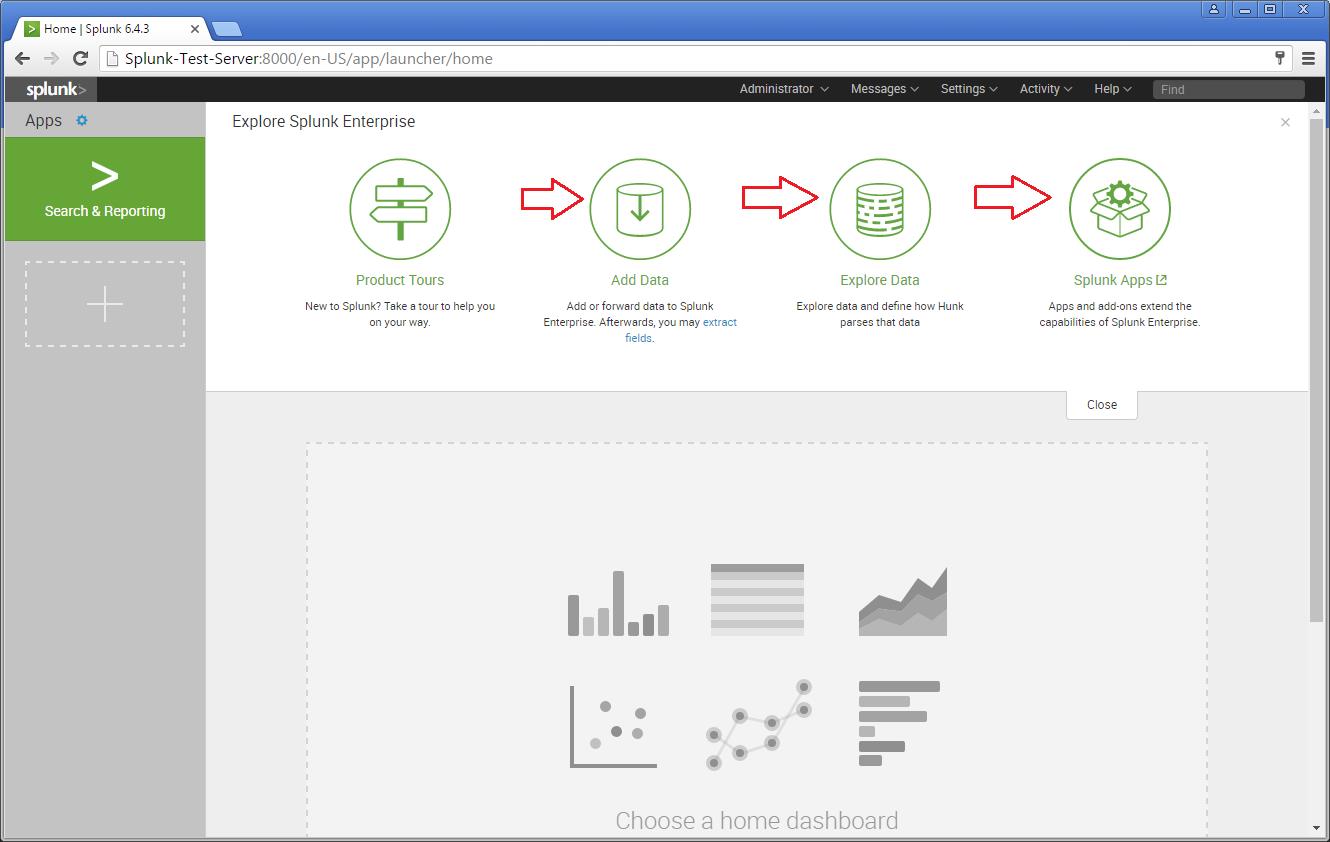
There are different categories listed over in the home page. You can choose the required one and start splunking.
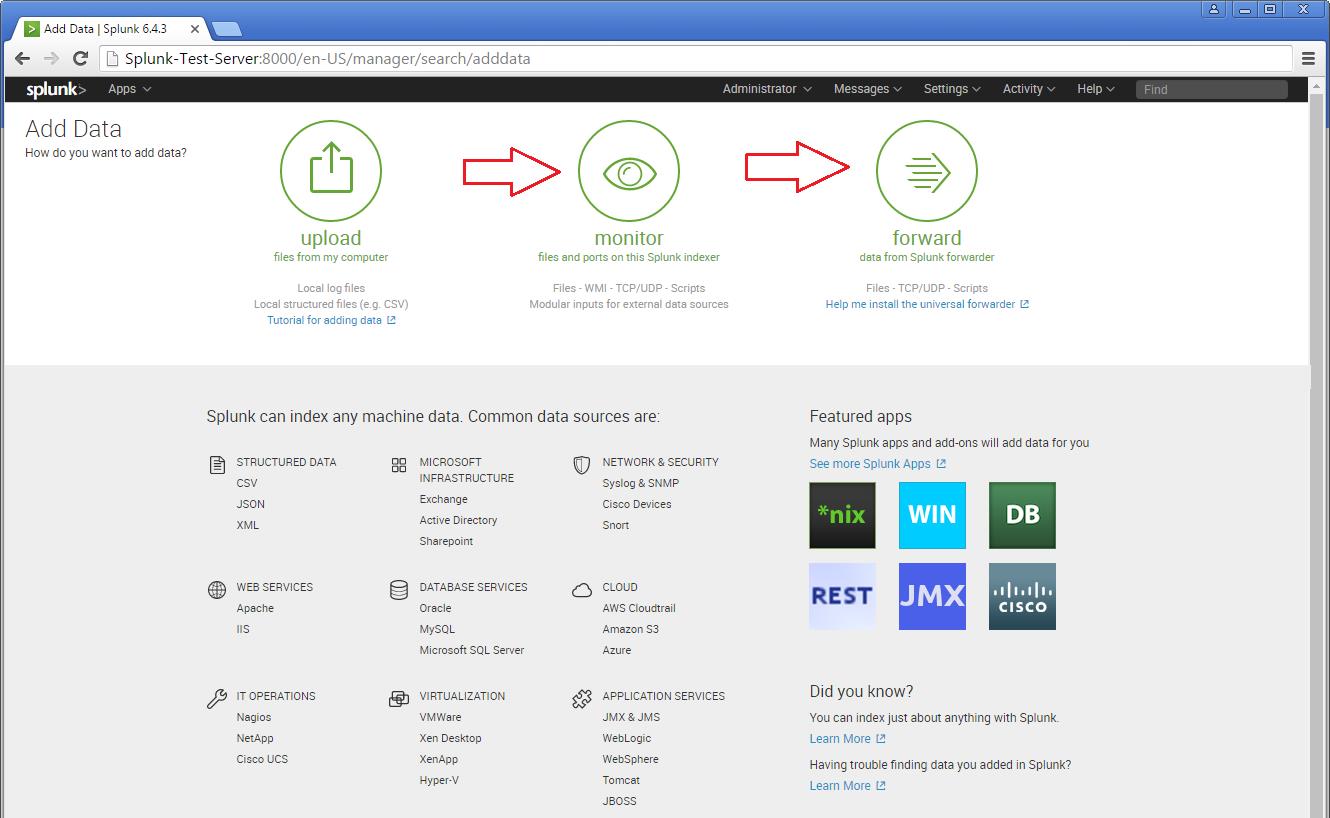
There are different categories listed over in the home page. You can choose the required one and start splunking.
Adding a task
I’m adding an example for a simple task which is been added to the Splunk system. Just see my snapshots to understand how I added it. My task is to add /var/log folder to the Splunk system for monitoring.
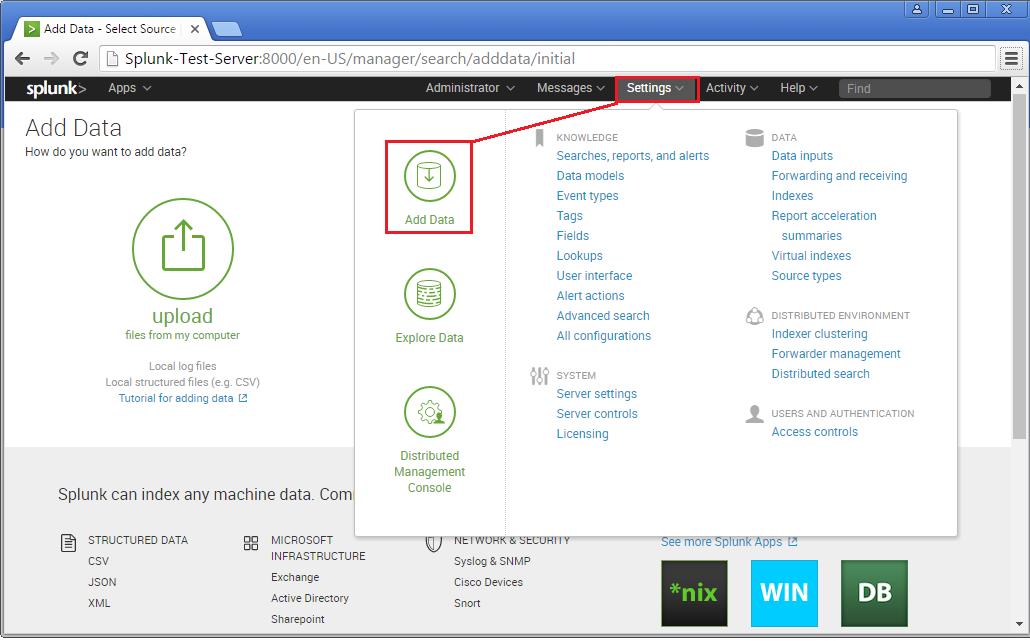
Step 1 >> Open up the Splunk Web interface. Click on the Settings Tab >> Choose the Add Data option.
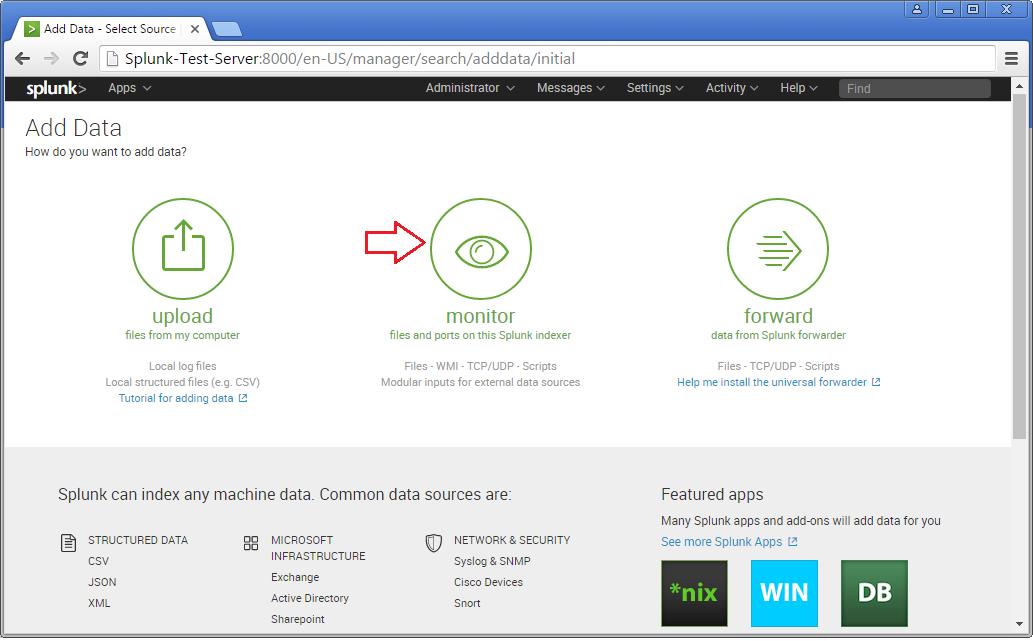
Step 2 >> The Add Data Tab opens up with three options : Upload, Monitor and Forward. The task here is to monitor a folder, hence will go ahead with Monitor.
In the Monitor option, there are four categories as below:
File & Directories : To monitor files/folders
HTTP Event Collector : Monitor data streams over HTTP
TCP/UDP : Monitor Service ports
Scripts : Monitor Scripts
Step 3 >> In this example, lets choose the Files & Directories option.
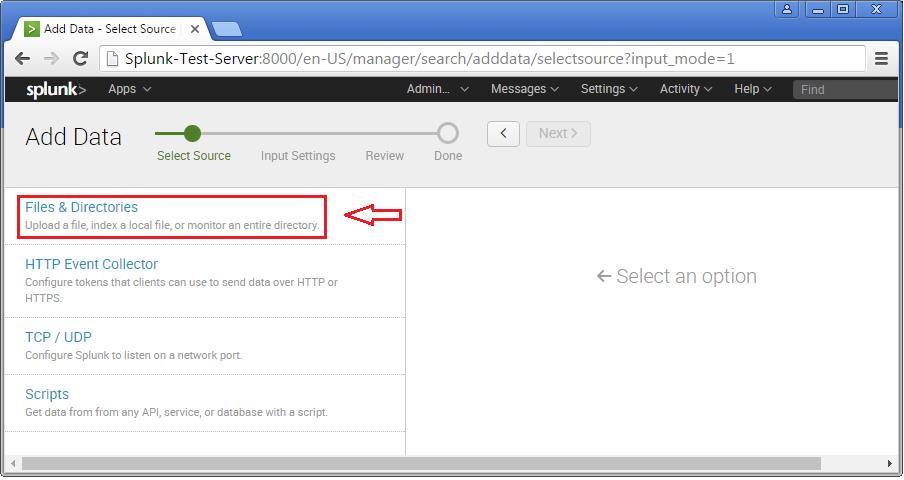
Step 4 >> IN this example choose the exact folder path from the server to monitor. Once you confirm with the settings, you can click Next and Review.
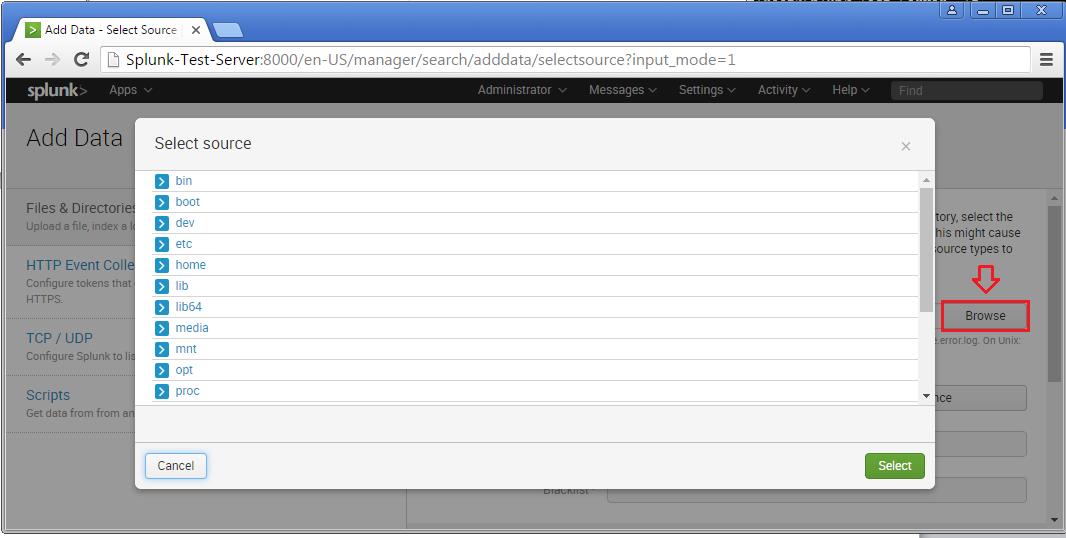
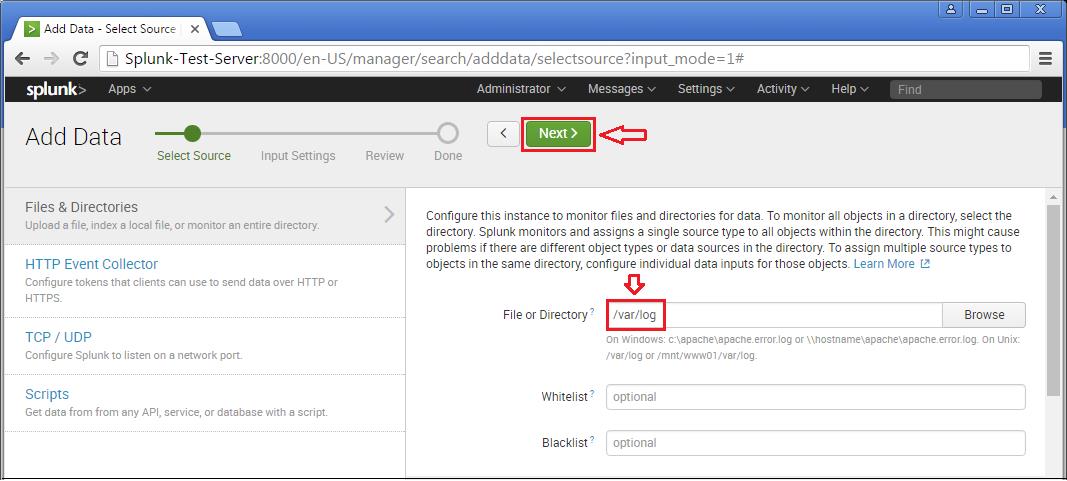
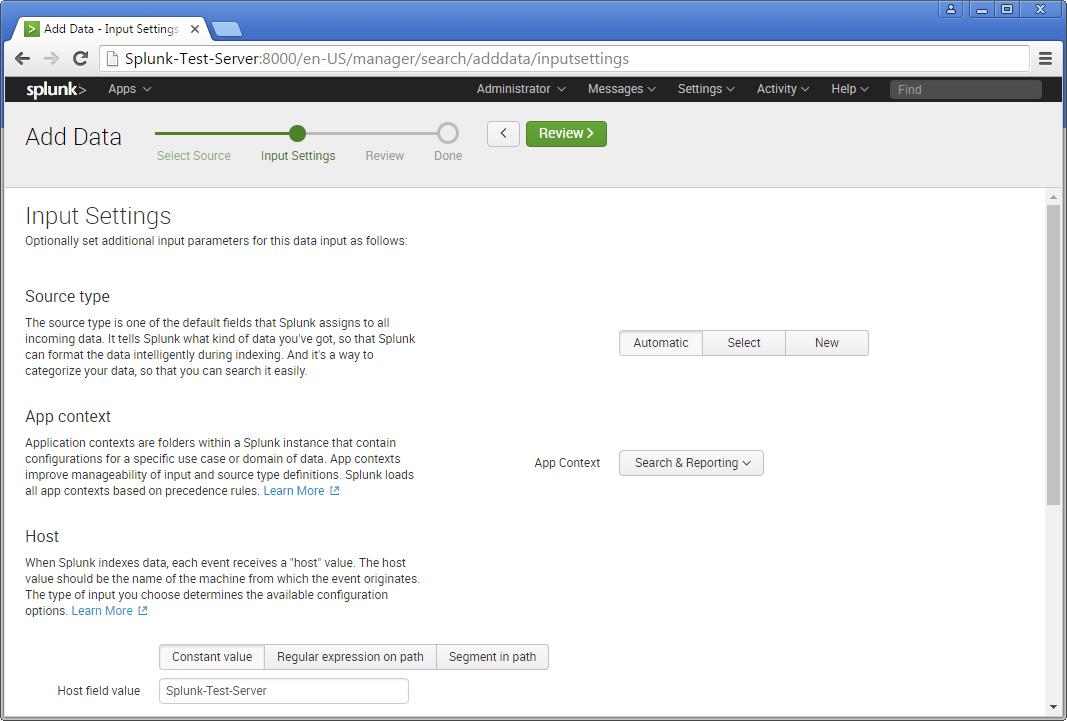
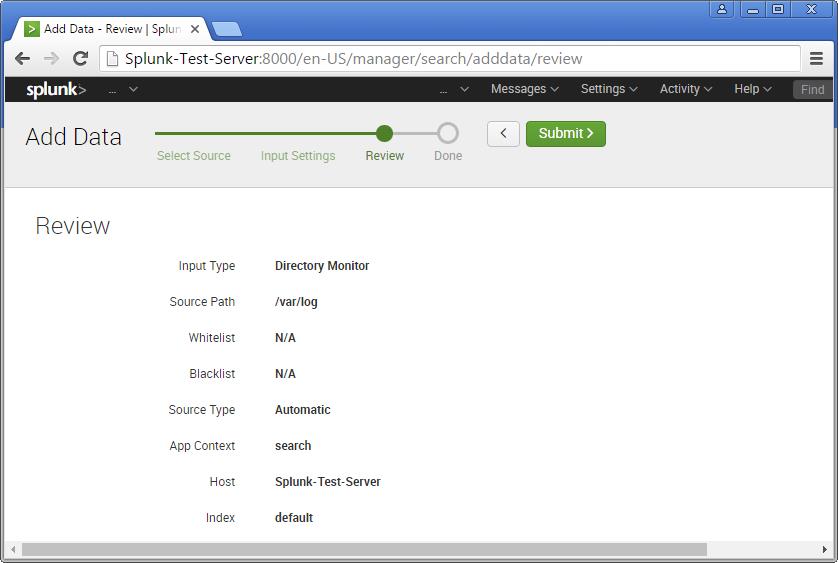
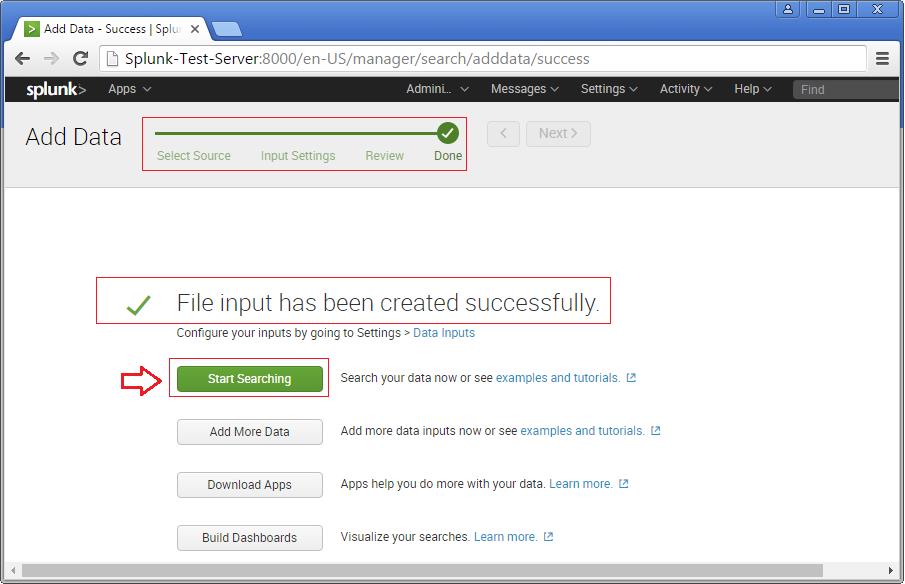
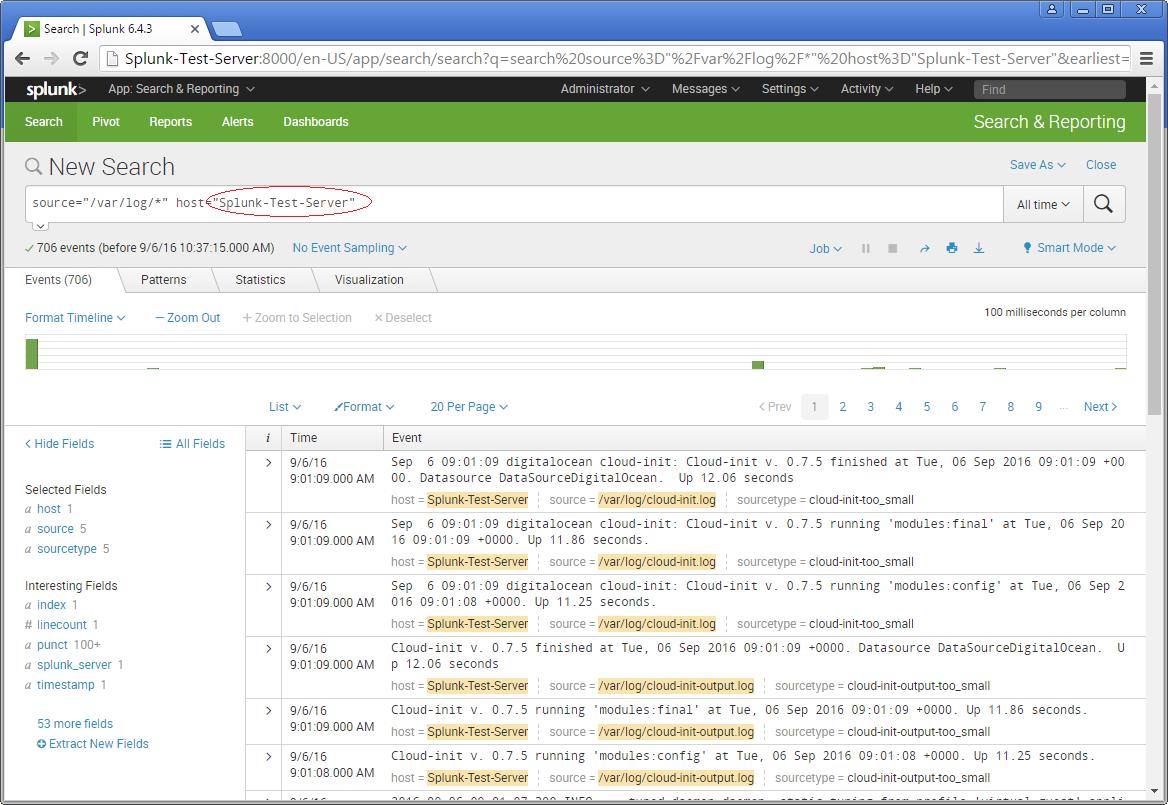
Now you will see the logs on the sample Splunk-Test-Server.
Please consider the above as an example for Splunking. It all depends upon the number of tasks you add to explore your server data. Happy Splunking !!
GNU/Linux Distributions & CI Tools

If you are newly introduced to the world of Linux, soon you will notice that it has mutiple faces or distributions. Once you know how distributions differ from each other then it can help you a lot in building your Linux experience. However, not every distributions are meant to be used by everyone hence it is important to select or indentify the right distro and at the same time nothing wrong to try out any distributions.
 CentOS Linux is a community-supported distribution derived from sources freely provided to the public by Red Hat for Red Hat Enterprise Linux (RHEL). As such, CentOS Linux aims to be functionally compatible with RHEL. The CentOS Project mainly change packages to remove upstream vendor branding and artwork. CentOS Linux is no-cost and free to redistribute. Each CentOS version is maintained for up to 10 years (by means of security updates — the duration of the support interval by Red Hat has varied over time with respect to Sources released). A new CentOS version is released approximately every 2 years and each CentOS version is periodically updated (roughly every 6 months) to support newer hardware. This results in a secure, low-maintenance, reliable, predictable and reproducible Linux environment.
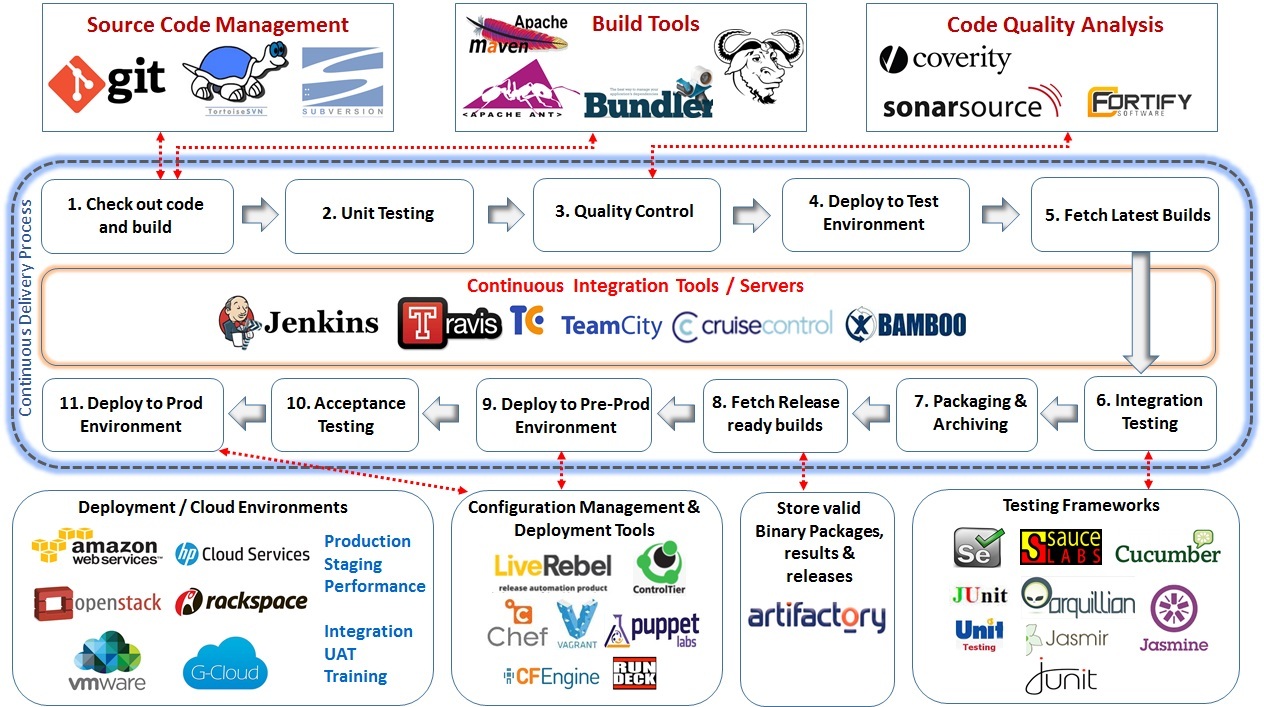
CI – Opensource Tools
Red Hat Enterprise Linux 7 – Integrating Linux Systems with Active Directory Environments
 Many IT environments are heterogeneous. In a mixed environment, there has to be some way to join systems to a single domain or a forest, either directly as clients or by creating separate domains or forests connected to each other. Red Hat Enterprise Linux can help a Linux system or an entire Linux forest integrate with an Active Directory environment.
The System Security Services Daemon (SSSD) provides access to different identity and authentication providers. This service ties a local system to a larger back end system. That can be a simple LDAP directory, domains for Active Directory or IdM in Red Hat Enterprise Linux, or Kerberos realms.
realmd to connects to an Active Directory Domain. realmd simplifies the configuration. realmd can run a service discovery to identify different, available domains ( both Active Directory and Red Hat Enterprise Linux Identity Management ), and then join the domain and manage user access. realmd can discover and support multiple domains because the underlying service (SSSD) supports multiple domains.
OpenStack – Building and managing public and private cloud computing platforms
- Compute (Nova)
- Object Storage (Swift)
- Block Storage (Cinder)
- Networking (Neutron)
- Dashboard (Horizon)
- Identity Service (Keystone)
- Image Service (Glance)
- Telemetry (Ceilometer)
- Orchestration (Heat)
- Database (Trove)
- Bare Metal Provisioning (Ironic)
- Multiple Tenant Cloud Messaging (Zaqar)
- Elastic Map Reduce (Sahara)
- Container Infrastructure Management Service (Magnum)
- Key Manager Service (Barbican)
| Service | Project name | Description |
| Dashboard | Horizon | Provides a web-based self-service portal to interact with underlying OpenStack services, such as launching an instance, assigning IP addresses and configuring access controls. |
| Compute | Nova | Manages the lifecycle of compute instances in an OpenStack environment. Responsibilities include spawning, scheduling and decommissioning of virtual machines on demand. |
| Networking | Neutron | Enables network connectivity as a service for other OpenStack services, such as OpenStack Compute. Provides an API for users to define networks and the attachments into them. Has a pluggable architecture that supports many popular networking vendors and technologies. |
| Storage | ||
| Object Storage | Swift | Stores and retrieves arbitrary unstructured data objects via a RESTful, HTTP based API. It is highly fault tolerant with its data replication and scale out architecture. Its implementation is not like a file server with mountable directories. |
| Block Storage | Cinder | Provides persistent block storage to running instances. Its pluggable driver architecture facilitates the creation and management of block storage devices. |
| Shared services | ||
| Identity service | Keystone | Provides an authentication and authorization service for other OpenStack services. Provides a catalog of endpoints for all OpenStack services. |
| Image Service | Glance | Stores and retrieves virtual machine disk images. OpenStack Compute makes use of this during instance provisioning. |
| Telemetry | Ceilometer | Monitors and meters the OpenStack cloud for billing, benchmarking, scalability, and statistical purposes. |
| Higher-level services | ||
| Orchestration | Heat | Orchestrates multiple composite cloud applications by using either the native HOTtemplate format or the AWS CloudFormation template format, through both an OpenStack-native REST API and a CloudFormation-compatible Query API. |
| Database Service | Trove | Provides scalable and reliable Cloud Database-as-a-Service functionality for both relational and non-relational database engines. |
OpenStack releases – MITAKA ( Current Stable Release )
| Series | Status | Release Date | EOL Date |
|---|---|---|---|
| Queens | Future | TBD | TBD |
| Pike | Future | TBD | TBD |
| Ocata | Next Release | TBD | TBD |
| Newton | Security supported | 2016-10-06 | |
| MITAKA | Security supported | 2016-04-07 | 2017-04-10 |
| Liberty | Security-supported | 2015-10-15 | 2016-11-17 |
| Kilo | EOL | 2015-04-30 | 2016-05-02 |
| Juno | EOL | 2014-10-16 | 2015-12-07 |
| Icehouse | EOL | 2014-04-17 | 2015-07-02 |
| Havana | EOL | 2013-10-17 | 2014-09-30 |
| Grizzly | EOL | 2013-04-04 | 2014-03-29 |
| Folsom | EOL | 2012-09-27 | 2013-11-19 |
| Essex | EOL | 2012-04-05 | 2013-05-06 |
| Diablo | EOL | 2011-09-22 | 2013-05-06 |
| Cactus | Deprecated | 2011-04-15 | |
| Bexar | Deprecated | 2011-02-03 | |
| Austin | Deprecated | 2010-10-21 |